
How to Migrate from Shared to Cloud Hosting: A 7-Step Guide

Planning a website migration from shared to cloud hosting can be a meaningful step up for your online presence. This comprehensive guide walks you through the entire process, from preparation to post-migration optimization, ensuring minimal downtime and maximum performance gains. Whether you’re experiencing slow load times, traffic spikes, or need enhanced security, this step-by-step shared to cloud hosting migration roadmap will help you transition smoothly to a more robust hosting environment.
Executive Summary
- Cloud hosting market will surpass $1 trillion by 2028, with global cloud computing market hitting $912.77 billion in 2025 (Precedence Research)
- Moving to cloud hosting can reduce Total Cost of Ownership (TCO) by up to 40% compared to traditional hosting (Accenture)
- Cloud hosting achieves uptimes exceeding 99.9% compared to shared hosting’s average of 99.5%
- Cloud platforms are engineered to absorb traffic spikes that overwhelm a shared server
How Cloud Hosting Slashes Page Load Times by 70% in 2025
Shared Hosting: The Entry-Level Option
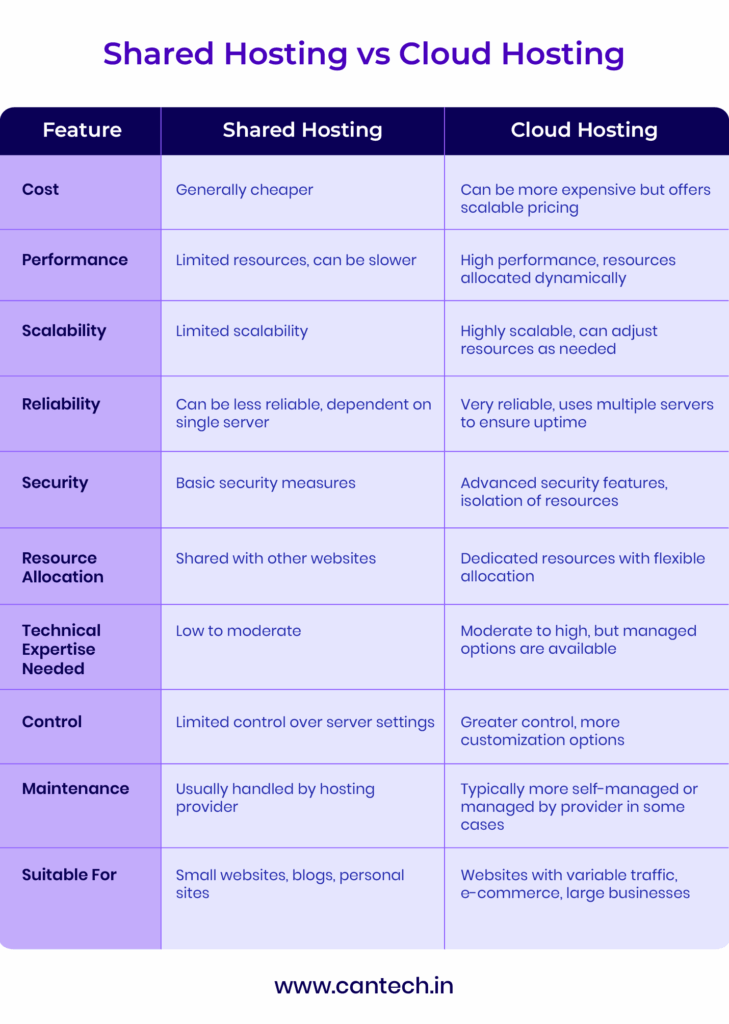
Shared hosting is like sharing a condo with multiple housemates where everyone shares the same space and amenities. Multiple websites share a single physical server along with its resources including CPU, RAM, storage, and bandwidth.
Key Characteristics:
- Multiple websites on one physical server
- Limited resource allocation
- Lower cost ($2.95-$9.99/month typically)
- Managed by the hosting provider
- Uptime varies per provider
- Best for small websites, blogs, and beginners
Cloud Hosting: The Performance heavyweight
Cloud hosting distributes your website across multiple virtualized servers, creating a network that functions as a single system. This architecture provides greater flexibility, scalability, and reliability.
Key Characteristics:
- Website hosted across multiple servers
- Dynamic resource allocation
- Pay-as-you-go pricing model ($5-$50+/month)
- High scalability during traffic spikes
- Backed by 99.9%+ uptime SLAs
- Best for growing businesses and high-traffic sites
Market Share Comparison (2025)
5 Powerful Reasons to Switch to Cloud Hosting Now
1. Lightning-Fast Performance
Cloud hosting leverages multiple servers to deliver consistently faster load times and better handling of traffic spikes. Cloud platforms are engineered to absorb traffic spikes that overwhelm a shared server.
The performance boost from cloud hosting isn’t just about numbers—it’s about creating a seamless user experience that keeps visitors engaged and reduces bounce rates significantly. — Tom Johnson, Performance Optimization Specialist
2. Unmatched Scalability On Demand
Cloud hosting scales resources automatically to accommodate traffic spikes, seasonal demand, or business growth without downtime or manual intervention. This means your website stays responsive even during viral traffic surges or marketing campaigns.
3. Enterprise-Grade Security
Advanced security features like DDoS protection, automated backups, SSL certificates, firewalls, and data replication reduce vulnerability compared to shared environments. Research shows 70% of cloud security incidents result from misconfiguration rather than sophisticated attacks, making proper setup crucial.
4. Near-Perfect Uptime
Cloud hosting achieves uptimes exceeding 99.9% compared to shared hosting’s average of 99.5%, translating to approximately 4 fewer hours of downtime per month. For e-commerce businesses, this directly impacts revenue protection.
5. Better Long-Term Value
While initial costs may be higher, cloud hosting’s pay-as-you-go model and reduced maintenance expenses can lead to 30-40% TCO savings over time according to Accenture research. You’ll also save countless hours managing technical issues.
Ready to Experience 70% Faster Website Loading?
Get a free cloud hosting performance assessment and see how much faster your site could be. Our experts will analyze your current setup and provide a detailed migration recommendation.
“Cloud migration isn’t just about moving to better technology—it’s a strategic business decision that impacts everything from operational efficiency to customer satisfaction. Organizations that successfully migrate see an average of 32% improvement in operational efficiency.”
Dr. Sarah Martinez, Cloud Migration Specialist, McKinsey Digital
Critical Signs Your Website Has Outgrown Shared Hosting
How do you know it’s time to make the move? Watch for these telltale indicators that your shared hosting environment is holding your website back:
1. Your Pages Take Forever to Load
If your website consistently takes more than 3 seconds to load, especially during peak traffic hours, it’s a clear sign you’ve outgrown shared hosting. Research shows a 1-second delay reduces conversions by 7%.
2. Traffic Spikes Crash Your Site
If your website regularly receives more than 10,000 visitors per day or experiences sudden traffic spikes that affect performance, shared hosting may no longer be sufficient. Cloud hosting’s automatic scaling prevents these crashes.
3. You’re Hitting Resource Limits
Frequent 503 Service Unavailable errors or hosting provider warnings about CPU/RAM usage indicate you’re hitting the limits of your shared hosting plan. This is especially common during promotional events or after media mentions.
4. Security Concerns Keep You Up at Night
If your website handles sensitive customer data or e-commerce transactions, the shared environment poses inherent security risks that cloud hosting can better address.
5. You Need Global Reach
A growing international audience requires content delivery from servers located closer to your visitors, which cloud hosting can provide through its distributed network. This reduces latency for international users by up to 65%.
Don’t wait for a crisis to migrate. The best time to plan your migration to cloud hosting is when you’re at about 70% of your shared hosting capacity. This gives you ample time to plan and execute a seamless transition without the pressure of performance issues affecting your business.
Essential Pre-Migration Checklist: What to Do Before You Move
Before starting the migration process, complete the following preparations to ensure a smooth transition:
Website Audit & Documentation
- ✅ Complete website inventory
Document all files, databases, subdomains, and email accounts on your current hosting. - ✅ Current hosting configuration
Document PHP version, server modules, custom configurations, and any specialized requirements. - ✅ Traffic analysis
Review traffic patterns, peak periods, and resource usage to determine cloud hosting requirements. - ✅ Benchmark current performance
Record page load times, server response times, and other performance metrics for comparison post-migration.
Backup & Preparation
- ✅ Create complete backups
Back up all website files, databases, email accounts, and configuration files. - ✅ Verify backup integrity
Test restoring from your backups in a staging environment to ensure they’re complete and functional. - ✅ Update software versions
Update your CMS, plugins, and scripts to their latest versions for compatibility with cloud environments. - ✅ Clean up unnecessary files
Remove outdated content, unused plugins, and temporary files to streamline migration.
Cloud Provider Selection
- ✅ Research cloud providers
Compare leading providers like AWS, Google Cloud, Azure, and specialized hosting providers based on your needs. - ✅ Calculate resource requirements
Determine CPU, RAM, storage, and bandwidth needs based on your website’s traffic and complexity. - ✅ Budget planning
Estimate monthly costs, including any additional services like CDN, backups, or managed support. - ✅ Technical compatibility check
Ensure the cloud provider supports all technologies and configurations your website requires.
Migration Planning
- ✅ Create a migration timeline
Establish a schedule that minimizes downtime, preferably during low-traffic periods. - ✅ Develop a rollback plan
Create a detailed process for reverting to shared hosting if critical issues arise during migration. - ✅ Notify stakeholders
Inform team members, clients, and users about the upcoming migration and potential temporary disruptions. - ✅ Set up monitoring tools
Implement monitoring solutions to track performance, uptime, and resource usage before, during, and after migration.
7-Step Cloud Migration Process: Your Complete Roadmap
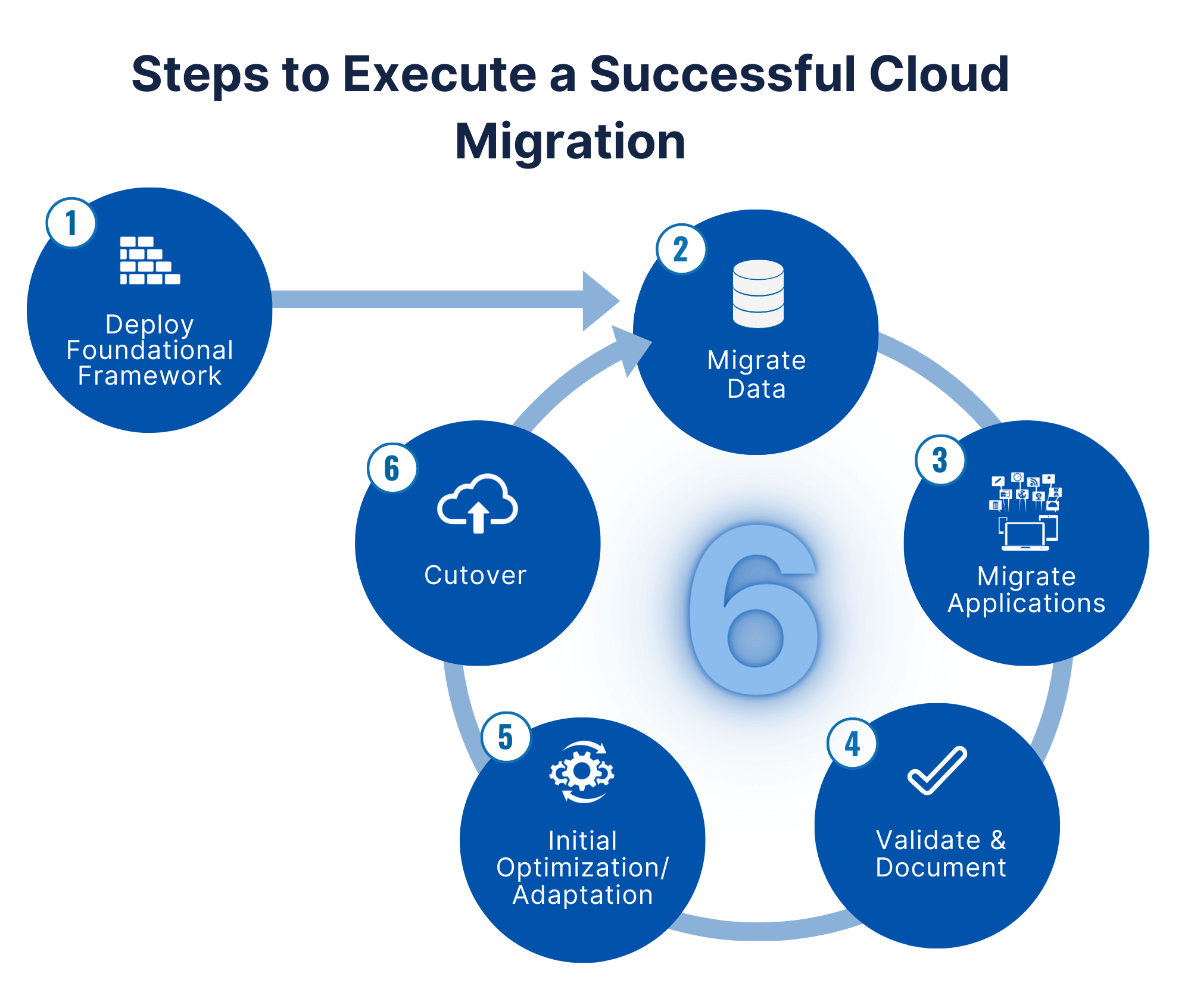
Step 1: Set Up Your Cloud Environment
Begin by provisioning your cloud hosting environment with the appropriate specifications for your website.
- Create an account with your chosen cloud provider (AWS, Google Cloud, Azure, etc.)
- Select the appropriate server type, region, and configuration based on your requirements
- Configure security groups, firewall settings, and access controls
- Install the required web server software (Apache, Nginx, etc.)
- Set up PHP, MySQL, or other required technologies with appropriate versions
- Configure server settings to match or improve upon your shared hosting environment
Pro Tip: Choose a server region closest to the majority of your audience to minimize latency.
Step 2: Migrate Your Website Files
Transfer all website files from your shared hosting to the cloud server.
- Use SFTP/FTP to download all files from your shared hosting
- Alternatively, create a compressed archive (.zip or .tar.gz) of your website files
- Upload the files to your cloud server using SFTP, SCP, or the cloud provider’s file manager
- Verify file permissions are set correctly (typically 644 for files, 755 for directories)
- Ensure all symbolic links are properly maintained
Command-line example (using SCP):
scp -r /path/to/local/files user@your-cloud-server:/path/to/destination
Step 3: Migrate Your Databases
Export and import your databases to maintain all your website’s content and settings.
- Create database backups from your shared hosting using phpMyAdmin or command-line tools
- Create new databases on your cloud server with the same names
- Import your database backups to the new cloud environment
- Update database credentials in your website’s configuration files
- Test database connections to ensure proper functionality
MySQL export and import example:
# Export from shared hosting
mysqldump -u username -p database_name > database_backup.sql
Import to cloud server
mysql -u new_username -p new_database_name < database_backup.sql
Step 4: Configure DNS and Domain Settings
Update your domain’s DNS settings to point to your new cloud server while minimizing downtime.
- Reduce your domain’s TTL (Time To Live) to 5-15 minutes at least 24-48 hours before migration
- Set up your domain on the cloud server’s web server configuration
- Test your website on the cloud server using a temporary domain or hosts file modification
- Once testing is successful, update your domain’s A records to point to your cloud server IP
- Verify DNS propagation using online tools like dnschecker.org
Pro Tip: Consider using a CDN like Cloudflare during the transition to minimize downtime risks.
Step 5: Migrate Email Accounts and Services
Transfer email accounts and other services from your shared hosting to your new environment.
- Set up email accounts on your cloud server or use a third-party email provider
- Update MX, SPF, DKIM, and DMARC records to ensure email delivery
- Migrate email content using IMAP synchronization tools
- Test email sending and receiving functionality
- Update any other services like FTP accounts, cron jobs, or SSL certificates
Step 6: Testing and Troubleshooting
Thoroughly test your website on the new cloud hosting environment before finalizing the migration.
- Verify all website pages load correctly
- Test all forms, e-commerce functionality, and user authentication
- Check website speed using tools like Google PageSpeed Insights or GTmetrix
- Review server logs for any errors or warnings
- Test site responsiveness on various devices and browsers
- Verify SSL certificate functionality and security
Step 7: Optimization and Final Steps
Finalize your migration by optimizing your cloud environment and completing administrative tasks.
- Implement cloud-specific optimizations like load balancing or auto-scaling
- Set up automated backups and disaster recovery processes
- Configure monitoring and alerts for your cloud resources
- Cancel your shared hosting plan once migration is complete and stable
- Document your new cloud environment configuration for future reference
- Create an ongoing maintenance plan for your cloud infrastructure
Need Expert Help With Your Migration?
Our cloud specialists can handle your entire migration process, ensuring zero downtime and optimal configuration of your new cloud environment.
Cloud Security Safeguards Worth Setting Up
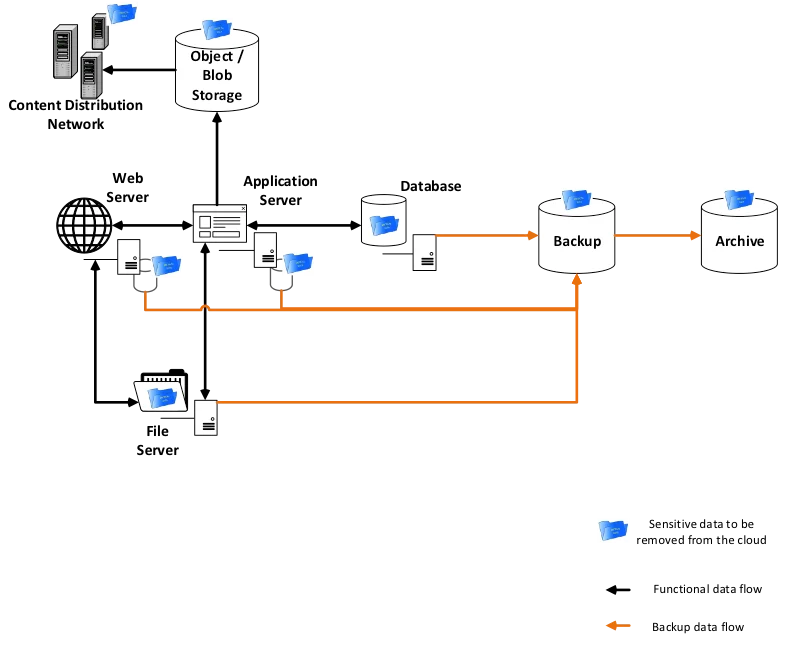
Migrating to cloud hosting provides an opportunity to strengthen your website’s security posture. Follow these essential security practices during and after migration:
Security Best Practices
Implement a Web Application Firewall (WAF)
A WAF filters HTTP traffic to your application, blocking common attacks like SQL injection, XSS, and CSRF. Cloud providers like AWS, Azure, and Google Cloud offer integrated WAF solutions that can be easily configured.
Use SSL/TLS encryption
Ensure all data transmitted between your server and users is encrypted with up-to-date SSL certificates. Most cloud providers offer free or low-cost SSL certificates through services like Let’s Encrypt.
Implement network security groups
Configure cloud firewall rules to allow only necessary traffic to your servers. This significantly reduces your attack surface by limiting access to required ports and protocols.
Set up regular vulnerability scanning
Use automated tools to scan your infrastructure and applications for security vulnerabilities. Many cloud providers include vulnerability assessment tools in their security offerings.
Implement secure access management
Use SSH keys instead of passwords, implement multi-factor authentication, and adopt the principle of least privilege for all user accounts and service roles.
Data Protection Measures
Automated backups
Configure regular automated backups with versioning to protect against data loss or ransomware. Store backups in geographically separate locations for maximum protection.
Data encryption
Implement encryption for data at rest and in transit using cloud provider encryption services. This ensures that even if data is intercepted or accessed inappropriately, it remains protected.
Access control logging
Enable detailed logging of all access to your cloud resources for audit and security monitoring. This provides an audit trail that’s invaluable for security investigations.
Implement DDoS protection
Use cloud provider DDoS mitigation services to protect against volumetric attacks. These services can automatically detect and mitigate attacks without impacting legitimate users.
Regular security audits
Conduct periodic security assessments of your cloud infrastructure and applications to identify and remediate potential vulnerabilities before they can be exploited.
“The migration to cloud hosting presents a unique opportunity to rebuild your security from the ground up. Don’t simply replicate your existing security measures—take advantage of cloud-native security tools and best practices that can provide stronger protection than what was possible in a shared hosting environment.”
Jennifer Lopez, Chief Information Security Officer, CloudSecure Inc.
Security Compliance Note
If your website handles sensitive data such as personal information or payment details, ensure your cloud configuration complies with relevant regulations like GDPR, CCPA, or PCI DSS. Cloud providers typically offer compliance certifications and features to help meet these requirements.
Lower Your 3-Year Hosting Costs by 40%: The True Economics of Cloud Migration
Understanding the financial implications of migrating from shared to cloud hosting requires analyzing both direct costs and indirect benefits:
| Cost Factor | Shared Hosting | Cloud Hosting | Considerations |
|---|---|---|---|
| Monthly Fee | $2.95 – $9.99/month | $5 – $50+/month | Cloud costs scale with usage; baseline costs are higher but provide more resources |
| Setup Costs | Minimal or none | May require initial configuration costs | Cloud setup may require professional services for optimal configuration |
| Scalability Costs | Requires plan upgrades with fixed increments | Pay-as-you-go for additional resources | Cloud offers more granular scaling without paying for unused capacity |
| Downtime Costs | Higher risk of costly downtime | Lower downtime risk with high availability options | Calculate the cost of an hour of downtime for your business |
| Performance Impact | Lost revenue from slower speeds | Improved conversion rates from faster performance | A 1-second delay in page response can reduce conversions by 7% |
| Resource Overhead | None – managed by provider | Requires some technical management | Factor in IT staff time or managed service costs |
| Security Costs | Limited security options | Advanced security available at additional cost | Security breaches can cost significantly more than preventative measures |
| Long-term TCO | Higher for growing sites due to limitations | Often lower for well-optimized implementations | Long-term cost comparisons often favour cloud for growing sites |
ROI Calculation Framework
To calculate your expected Return on Investment (ROI) when migrating to cloud hosting, consider these factors:
Costs to Include:
- Initial migration costs (time and resources)
- Cloud hosting monthly/annual fees
- Additional services (CDN, backup, security)
- Technical training or consulting
- Management and monitoring tools
Benefits to Quantify:
- Reduced downtime (calculate hourly cost of downtime)
- Improved conversion rates from better performance
- Staff time saved from automated scaling and maintenance
- Avoided hardware refresh/upgrade costs
- Increased capacity to handle traffic and growth
Sample ROI Formula:
ROI = [(Increased Revenue + Cost Savings) – Total Cloud Migration Costs] / Total Cloud Migration Costs × 100%
Post-Migration Optimization: Maximizing Your Cloud ROI
After successfully migrating to cloud hosting, implement these optimizations to maximize performance and cost efficiency:
Performance Optimization
Implement a Content Delivery Network (CDN)
Cache and deliver content from edge servers closest to your users, reducing latency and improving global performance by up to 50%.
Enable HTTP/2 or HTTP/3 protocol
These newer protocols provide faster content delivery through multiplexing, header compression, and server push capabilities.
Optimize database queries and implement caching layers
Implement object caching solutions like Redis or Memcached to reduce database load and speed up dynamic content delivery.
Use cloud auto-scaling
Configure automatic scaling rules to handle traffic spikes efficiently without manual intervention or performance degradation.
Enable browser caching
Set appropriate cache headers to allow browsers to store static assets locally, reducing load times for repeat visitors.
Implement image optimization
Use next-gen formats like WebP, responsive images, and lazy loading to reduce page weight and improve loading times.
Cost Optimization
Implement resource monitoring and right-sizing
Regularly analyze resource utilization and adjust instance sizes to avoid paying for unused capacity.
Use reserved instances or committed use discounts
For predictable workloads, leverage pricing discounts by committing to specific usage levels over time.
Set up auto-scaling policies for off-peak periods
Configure your environment to scale down during low-traffic periods like nights or weekends to reduce costs.
Implement lifecycle policies for storage
Automatically move infrequently accessed data to cheaper storage tiers to optimize storage costs.
Review and eliminate unused resources
Regularly audit your cloud resources to identify and remove orphaned volumes, unused instances, or outdated snapshots.
Configure cost alerts and budgets
Set up notifications for unexpected spending increases to catch potential issues before they become expensive problems.
Monitoring & Maintenance
Set up comprehensive monitoring
Implement monitoring for performance, security, and availability metrics to maintain visibility into your environment health.
Configure alerts for anomalies
Create notification systems for unusual patterns or threshold breaches that could indicate problems.
Implement automated backup and disaster recovery testing
Regularly test your backup and recovery procedures to ensure they work when needed.
Establish regular security scanning
Schedule automated vulnerability scans and implement a patch management process to address security issues promptly.
Document your cloud infrastructure
Maintain updated diagrams and configuration details for your cloud environment to aid in troubleshooting and knowledge transfer.
Create runbooks for common tasks
Document step-by-step procedures for routine maintenance and emergency scenarios to ensure consistent operations.
“The work doesn’t end after migration—it’s just beginning. Cloud environments offer tremendous potential for optimization that simply wasn’t available in shared hosting. Take time to learn your cloud provider’s tools and best practices, and continuously refine your setup to achieve the perfect balance of performance, cost, and security.”
David Kim, Cloud Optimization Specialist, TechCloud Solutions
Continuous Improvement Cycle
Implement this cycle to continuously optimize your cloud hosting environment:
1. Monitor
Collect performance, cost, and security metrics to establish baselines and identify trends.
2. Analyze
Identify patterns, bottlenecks, and optimization opportunities through data analysis.
3. Implement
Make targeted improvements based on analysis findings, focusing on high-impact changes.
4. Review
Measure impact of changes and adjust approach as needed based on results.
Maximize Your Cloud Hosting Investment
Our cloud optimization experts can help you fine-tune your environment for peak performance and minimal cost. Get a comprehensive analysis and optimization plan tailored to your specific needs.
What Industry Leaders Say About Cloud Hosting in 2025
Key Takeaways from Industry Experts
- Begin with a thorough assessment of your current infrastructure before planning migration
- Don’t simply lift and shift your existing setup; redesign for cloud-native advantages
- Prioritize security and compliance requirements from the beginning of planning
- Test thoroughly in a staging environment before cutting over production traffic
- Monitor performance and costs closely for the first 90 days post-migration
- Invest in training technical staff on cloud technologies and best practices
- Consider hybrid approaches that leverage both cloud and traditional hosting during transition
- Document your cloud architecture and create operational playbooks for ongoing management
Frequently Asked Questions
How long does migration from shared to cloud hosting typically take?
Migration duration depends on website size and complexity. For small websites with minimal databases, the process may take 24-48 hours. Larger websites with complex databases and many files could require 3-7 days. The actual downtime during migration can be limited to just a few minutes with proper planning and DNS management.
What is the typical cost difference between shared and cloud hosting?
Shared hosting typically ranges from $2.95 to $9.99 per month, while cloud hosting starts around $5 and can exceed $50 monthly depending on resource requirements. However, cloud hosting offers a pay-as-you-go model, allowing you to pay only for resources you use. When factoring in improved performance, reliability, and scalability, many businesses find cloud hosting delivers better overall value despite higher nominal costs.
Will migrating to cloud hosting improve my website’s SEO?
Yes, cloud hosting can positively impact SEO in several ways. Faster page load times, which cloud hosting typically provides, are a known Google ranking factor. Additionally, improved uptime and reliability ensure search engines can always access your site for crawling. Cloud hosting’s global distribution capabilities can also improve loading speeds for international audiences, which helps with geographic SEO targeting.
How do I prevent downtime during migration?
To minimize downtime during migration:
- Lower your domain’s TTL (Time To Live) to 5-15 minutes at least 48 hours before migration
- Set up your website on the cloud server while keeping your shared hosting active
- Test thoroughly on the cloud server using a staging domain or hosts file modification
- Once verified, update your DNS records during a low-traffic period
- Implement a maintenance page that works on both old and new servers during transition
- Consider using a CDN as an intermediate layer to further reduce downtime
Do I need technical expertise to manage cloud hosting?
The level of technical expertise required depends on the type of cloud hosting you choose. Managed cloud hosting providers handle most of the technical aspects for you, similar to shared hosting but with cloud benefits. Self-managed cloud hosting (like direct AWS, Google Cloud, or Azure instances) requires more technical knowledge to configure and maintain. Many businesses opt for managed cloud solutions or work with partners who can provide the necessary expertise.
Which cloud hosting provider is best for small businesses migrating from shared hosting?
For small businesses making their first move to cloud hosting, these providers offer good balance of features, cost, and ease of use:
- DigitalOcean — Known for simplicity, transparent pricing, and excellent documentation
- Cloudways — Managed cloud platform that simplifies AWS, Google Cloud, and other providers
- SiteGround Cloud — Bridges the gap between shared and cloud with managed services
- Kinsta — Specialized managed WordPress hosting on Google Cloud infrastructure
- A2 Hosting — Offers turbo-powered cloud hosting with an easy transition from shared plans
The best choice depends on your specific needs, budget, and technical comfort level.
Future Trends in Cloud Hosting (2025-2026)
As you plan your migration to cloud hosting, consider these emerging trends that will shape the industry in 2025-2026:
AI-Powered Infrastructure Optimization
Cloud providers are increasingly incorporating AI to automatically optimize resource allocation, security postures, and performance. These systems can predict traffic spikes, preemptively scale resources, and identify potential security threats before they impact your website.
Adoption Timeline: Widespread by Q3 2025
Zero Trust Security Architecture
Moving beyond traditional perimeter-based security, cloud providers are implementing comprehensive zero-trust frameworks that verify every access request regardless of source. This approach significantly reduces vulnerability to both external and internal threats.
Adoption Timeline: Standard practice by Q1 2026
Serverless Architecture Dominance
Serverless computing is moving from an option to the default for many applications. This approach eliminates the need to provision and manage servers, automatically scaling based on demand and charging only for actual computation used rather than idle capacity.
Adoption Timeline: 40% market share by end of 2025
Green Cloud Computing
Sustainability is becoming a key differentiator among cloud providers. Energy-efficient data centers powered by renewable energy sources are reducing the carbon footprint of cloud hosting. Many providers now offer carbon footprint metrics and tools to optimize for environmental impact.
Adoption Timeline: Standard reporting by Q2 2025
Edge Computing Integration
Cloud providers are expanding their edge computing capabilities, placing computing resources closer to end-users. This reduces latency and improves performance for applications requiring real-time processing, particularly beneficial for global audiences.
Adoption Timeline: Mainstream by Q4 2025
FinOps as Standard Practice
Financial Operations (FinOps) is emerging as a critical discipline for cloud cost management. This approach combines financial accountability, technology optimization, and business value delivery to manage and optimize cloud spend effectively.
“The next wave of cloud innovation won’t just be about technical capabilities—it will be about accessibility and democratization. We’re seeing cloud providers develop more intuitive interfaces and automation that allow businesses of all sizes to leverage advanced cloud features without requiring deep technical expertise. This will accelerate migration from traditional hosting models in the coming years.”
Sophia Ramirez, Cloud Futurist, Next Gen Cloud Alliance
Essential Resources and Tools for Successful Migration
If part of your reason for moving to cloud hosting is to self-host your own apps, our Dawarich review and Brows3 review show what running a self-hosted stack looks like in practice, and our jurniti review covers a sandboxed cloud environment for AI workloads.
Migration Tools
All-Inkl Migrator
Automated tool for transferring websites between hosting providers with minimal manual intervention.
Duplicator Pro
WordPress migration plugin with cloud integration for seamless transfers of WordPress sites.
Cloudways Migrator
One-click migration tool specifically designed for WordPress websites moving to cloud environments.
GoodSync
File synchronization and backup tool for seamless transfers between different hosting environments.
cPanel Transfer Tool
Built-in transfer utility for cPanel-to-cPanel migrations with automatic DNS updates.
Monitoring & Optimization
New Relic
Comprehensive application and infrastructure monitoring for deep visibility into performance.
Datadog
Cloud-scale monitoring and analytics platform for tracking every aspect of your environment.
Pingdom
Website uptime and performance monitoring with real-time alerts and historical reporting.
Cloudflare
CDN, security, and performance optimization services for enhanced website delivery.
GTmetrix
Website performance testing and recommendations for optimizing loading times.
Educational Resources
AWS Getting Started
Comprehensive guides for Amazon Web Services implementation and best practices.
Google Cloud Documentation
Complete resource for Google Cloud Platform setup, configuration, and optimization.
Microsoft Azure Docs
Detailed Azure cloud documentation and tutorials for all service offerings.
DigitalOcean Tutorials
User-friendly guides for cloud server management and optimization techniques.
FinOps Foundation
Resources for cloud financial management and cost optimization strategies.
Conclusion
Key Takeaways
- Migrating from shared to cloud hosting delivers significant benefits in performance, reliability, scalability, and security
- The process requires careful planning but can be executed with minimal downtime when properly orchestrated
- While initial costs may be higher, the long-term ROI often justifies the investment through improved user experience and business outcomes
- Cloud hosting’s flexibility makes it adaptable to growing business needs without the limitations of shared environments
- Post-migration optimization is essential to maximize the benefits of cloud hosting
Implementation Timeline
| Phase | Timeline | Activities |
|---|---|---|
| Week 1-2 | Research and planning | Provider selection, architecture planning, resource calculation |
| Week 3 | Preparation | Backup creation, environment setup, TTL adjustment |
| Week 4 | Migration execution | File transfer, database migration, DNS changes, testing |
| Week 5-6 | Post-migration optimization | Performance tuning, security hardening, monitoring setup |
| Month 3-6 | Continuous improvement | Advanced feature implementation, cost optimization, performance refinement |
Ready to Experience the Benefits of Cloud Hosting?
The migration from shared hosting to cloud hosting represents more than just a technical upgrade—it’s a strategic business decision that can deliver substantial long-term benefits. As websites and applications become increasingly critical to business success, the limitations of shared hosting become more apparent. Cloud hosting provides the flexibility, reliability, and performance necessary to support growth and deliver exceptional user experiences.
While the migration process requires careful planning and execution, the robust ecosystem of tools and resources available makes it accessible even for organizations with limited technical expertise. With proper preparation and a clear understanding of your requirements, you can achieve a smooth transition that positions your digital presence for future success.