
Every few months on r/macapps, someone posts a deal on a paid OCR or translation app — and within a handful of comments, somebody replies with a link and the word “free.” This Easydict review exists because that reply keeps naming the same app. Easydict has 14,200 GitHub stars and almost no independent review coverage, which is an odd gap for a tool this widely recommended.
Ben-G — independent reviewer at Spineye. Reviews are research-based: documentation, release notes, community discussions and real user reports, with sources linked. Where I’ve used a tool hands-on, I say so explicitly. How we review · LinkedIn
Verdict: the most capable free translation utility on macOS, and the only one that combines system-wide shortcuts, offline OCR and twenty-plus engines — including your own AI models — in a single menu-bar app. Held back by a setup that assumes you’ll bring your own API keys and documentation that is still partly Chinese-first.
What Is Easydict?
Easydict is a free, GPL-licensed dictionary and translator for macOS, built by developer tisfeng. It lives in your menu bar and answers three kinds of request: type a word, select text anywhere and hit a shortcut, or screenshot a region of your screen and have the text read out of the image and translated.
What separates it from Apple’s built-in translation is breadth. Rather than committing to one provider, Easydict queries several at once and stacks the results, so you can see how DeepL, Google and an AI model each handle the same sentence.
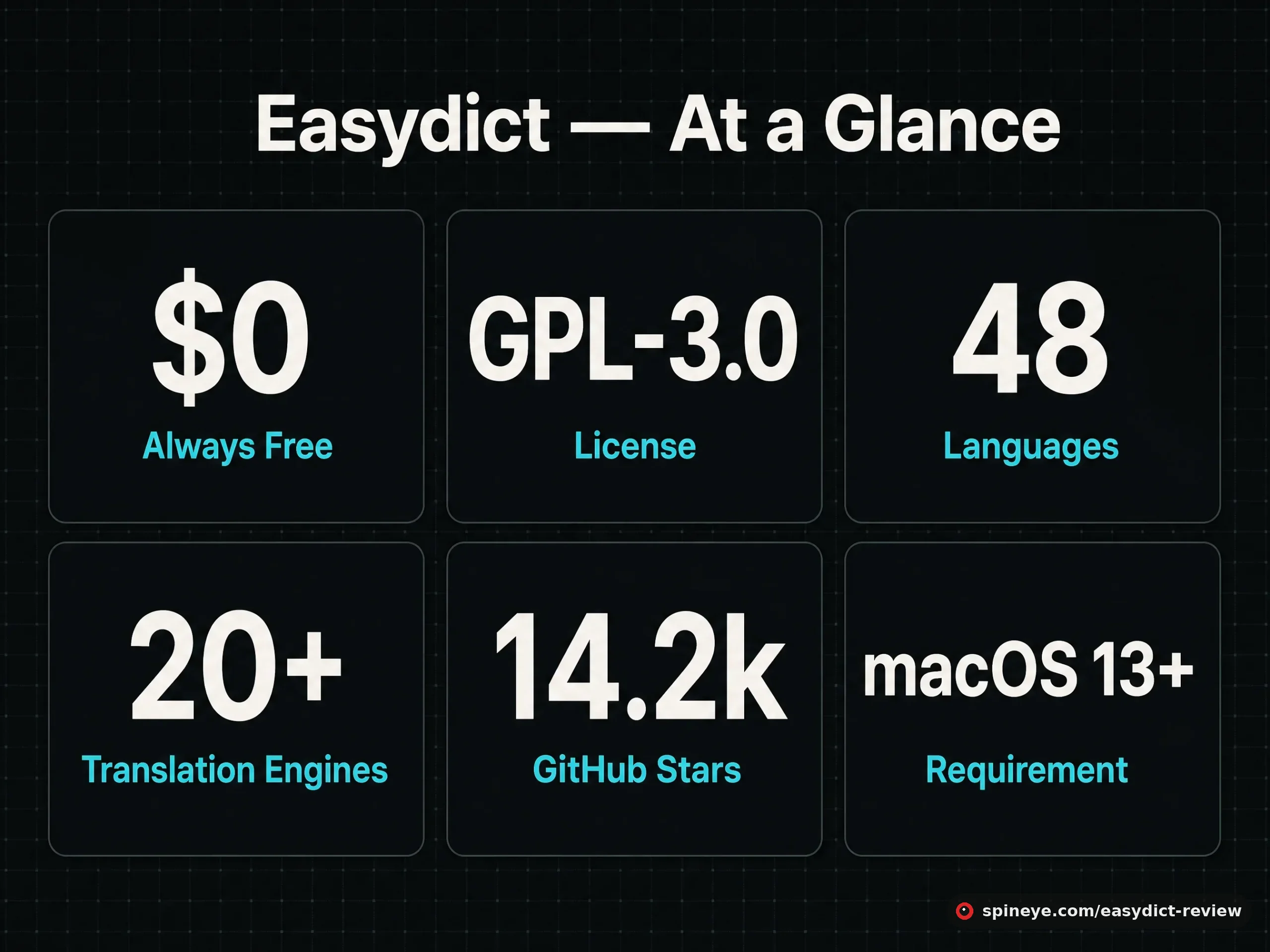
| Spec | Detail |
|---|---|
| Price | Free — no tiers, no trial, no paywalled features |
| License | GPL-3.0, fully open source |
| Platform | macOS 13.0+ (version 2.7.2 remains available for older systems) |
| Languages | 48 |
| Install | brew install –cask easydict or a DMG from GitHub releases |
| Community | 14,200 stars, 715 forks, 4,058 commits |
| Shortcuts | ⌥ + A input translate · ⌥ + S screenshot translate |
The Engine List Is the Point
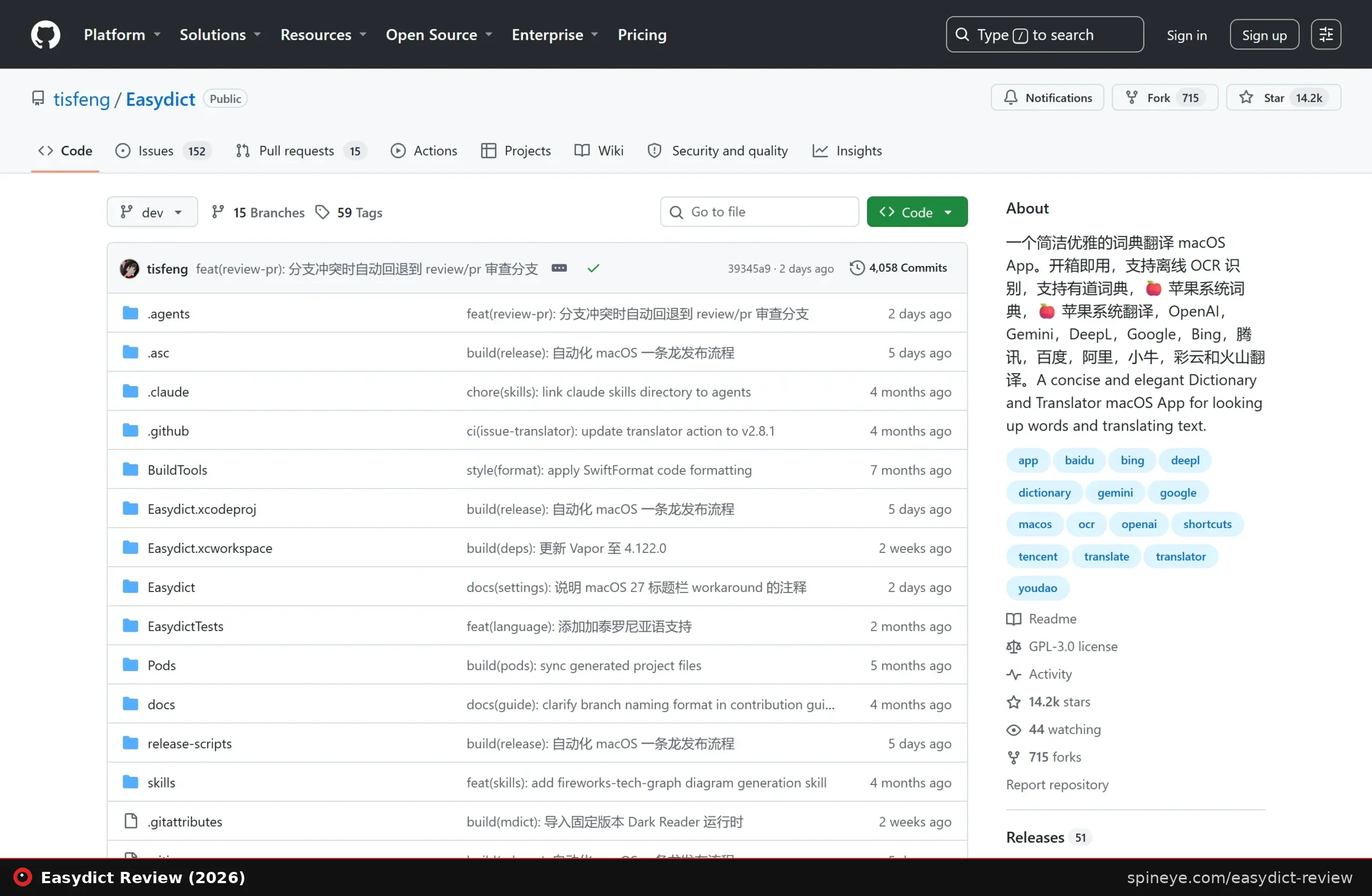
Most translation apps pick a provider and hide it. Easydict does the opposite — it supports Apple Dictionary, Apple Translate, DeepL, Google, Bing, Youdao, Tencent, Baidu, Alibaba, Niutrans, Caiyun, Volcano and Doubao, alongside AI models from OpenAI, Gemini, DeepSeek, Groq, Zhipu AI, GitHub Models and locally-run Ollama.
That Ollama entry matters more than it looks. It means you can route translation through a model running on your own Mac, so the text never leaves the machine — the same privacy argument that drives people to self-hosted software generally. For anyone translating contracts, medical notes or unreleased work, that is a genuinely different proposition from pasting into a web box.
Three Ways to Translate
- Input translate (⌥ + A) — the classic: open the window, type or paste, read several engines’ answers side by side.
- Select translate — highlight text in any app and translate it in place, either by shortcut or by hovering over the selection.
- Screenshot translate (⌥ + S) — drag a box over anything on screen. Offline OCR reads the text out of the image, then translates it. There is also a silent OCR mode that skips translation and drops the recognised text straight onto your clipboard.
That last mode is why Easydict keeps appearing in threads about paid OCR tools: it does the text-extraction job those apps charge for, and translation on top, for nothing.
What Users Actually Say
Easydict’s community footprint is small but consistent — it surfaces as a recommendation rather than as its own discussion, which is exactly the profile of an under-reviewed tool.
“Love easydict… wish there was a windows version or something even remotely comparable.”
Commenter in a 334-upvote macOS software recommendation thread, r/macapps“Check out Easydict (free), a menubar translator with Input/Screenshot/Select/OCR.”
Reply in a thread praising a different OCR app, r/macappsThe pattern to notice: in a thread about a paid OCR app on sale, a commenter called Easydict “the best, including a translator.” People who find it tend to stop shopping — and the main complaint is that it does not exist on Windows.
Easydict vs the Alternatives
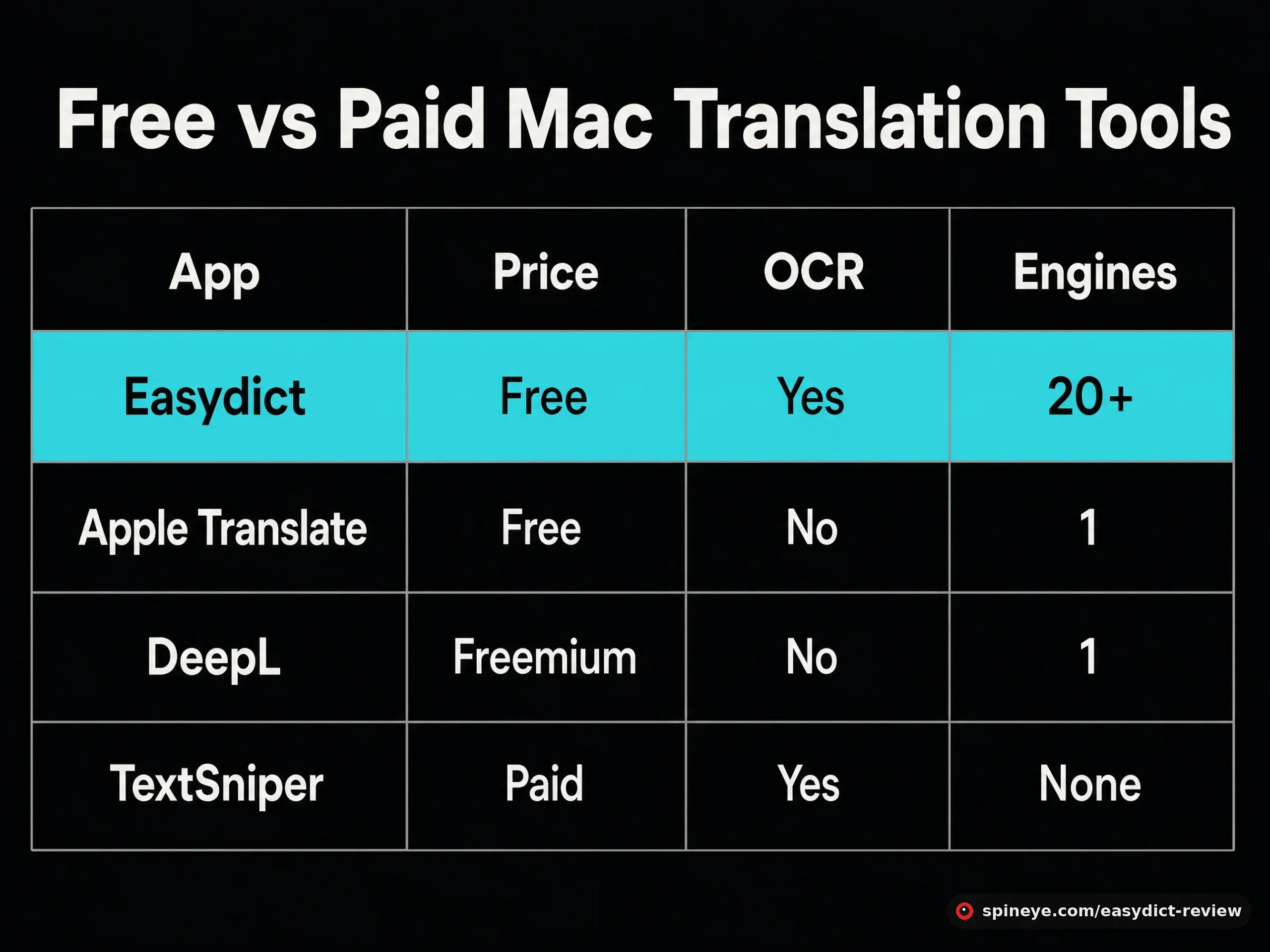
| App | Price | OCR | Engines | Open source |
|---|---|---|---|---|
| Easydict | Free | Yes, offline | 20+ | Yes (GPL-3.0) |
| Apple Translate | Free, built in | No | 1 | No |
| DeepL for Mac | Freemium | No | 1 | No |
| TextSniper | Paid | Yes | None (OCR only) | No |
Read that table as a job-fit question rather than a scoreboard. If you translate the occasional sentence, Apple Translate is already on your Mac and costs nothing to learn. If you care about one provider’s quality above all, DeepL’s own app is more polished. If you only need text out of images, TextSniper is a focused, supported product with a company behind it. Easydict wins when you want all three jobs in one shortcut — and when comparing engines, or keeping translation local via Ollama, is worth a bit of setup.
Pros and Cons
Pros
- Completely free and GPL-licensed, with an auditable codebase
- Twenty-plus engines, including local models via Ollama
- Offline OCR — screenshot translate needs no upload
- Three input modes behind system-wide shortcuts
- Side-by-side results expose where engines disagree
- 48 languages, automatic language detection, text-to-speech
- Very actively developed: 4,000+ commits
Cons
- macOS only — no Windows or Linux version, the top user complaint
- Premium engines need your own API keys
- Requires macOS 13+ for the current release
- Documentation is partly Chinese-first; the English README lags
- Shortcut conflicts with other apps are commonly reported
- Many engines means a settings screen that takes time to tame
Is Easydict Right for You?
Who Should Install It — and Who Shouldn’t
Best for:
- People who read across languages daily — researchers, developers reading foreign docs, anyone in a multilingual workplace
- Anyone about to pay for an OCR utility who hasn’t checked the free option first
- Privacy-minded users who want translation to stay on the machine via Ollama
- Translators who want to sanity-check one engine against another
Skip it if:
- You are not on macOS — there is no port, and users keep asking
- You want zero configuration and Apple Translate already covers you
- You are on macOS 12 or older and would rather not run a frozen 2.7.2 build
Getting Started
The quickest install is Homebrew: brew install –cask easydict. Otherwise grab the DMG from the releases page. On first launch, grant accessibility and screen-recording permissions — select translate and screenshot translate cannot work without them — then set your shortcuts before adding any API keys. Apple Dictionary and Apple Translate work straight away, so you can decide whether you need the paid engines at all.
Final Verdict
Easydict is the rare free tool that outclasses paid competitors on capability rather than just on price. Offline OCR, twenty-plus engines and local-model support in one menu-bar app is a combination nothing else on macOS matches for free. The points it loses are honest ones: it is Mac-only, its best engines want your API keys, and its documentation still shows its Chinese-first origins. If you read across languages on a Mac, it belongs in your menu bar.
Frequently Asked Questions
Is Easydict free?
Yes, entirely. It is GPL-3.0 open source with no paid tier, trial or locked features. The only costs are optional: if you connect premium engines such as DeepL or OpenAI, you pay those providers directly.
Does Easydict work offline?
OCR text recognition runs offline, so screenshot capture works without a connection. Translation itself depends on the engine — cloud services need internet, but a local model through Ollama keeps everything on your Mac.
Which translation services does it support?
Apple Dictionary and Apple Translate out of the box, plus DeepL, Google, Bing, Youdao, Tencent, Baidu, Alibaba, Niutrans, Caiyun, Volcano and Doubao — and AI models from OpenAI, Gemini, DeepSeek, Groq, Zhipu AI, GitHub Models and Ollama.
Is there a Windows or Linux version?
No. Easydict is macOS-only and needs macOS 13 or newer for the current release; version 2.7.2 still runs on older systems. The absence of a Windows build is the single most common complaint from people who recommend it.
Can Easydict replace a paid OCR app?
For extracting text from screenshots, largely yes — it includes offline OCR with a silent mode that copies recognised text to the clipboard. Paid tools may offer extra polish and support, but Easydict covers the core job at no cost.
Do I need API keys to use it?
Not to start. Apple’s dictionary and translation work immediately. Keys are only needed for premium engines like DeepL, OpenAI or Gemini.
Is Easydict safe to install?
The source is public under GPL-3.0 with more than 4,000 commits and an active maintainer, so the code can be audited or built yourself. It does request accessibility and screen-recording permissions — necessary for select and screenshot translation, and worth understanding before you grant them.
What are the shortcuts?
⌥ + A for input translate and ⌥ + S for screenshot translate by default. Both are configurable, which matters because clashes with other apps are a common report.
Sources
- Easydict GitHub repository and its English README — features, engines, requirements, license
- r/macapps recommendation threads: macOS software recommendations, OCR app discussion — user reports
- DeepL and TextSniper — comparison data
Easydict is the kind of find this site exists for: widely recommended in small communities, barely reviewed anywhere else. If local-first tools appeal to you, our Dawarich review covers the self-hosted answer to Google Timeline, and the Brows3 review looks at a free S3 browser found the same way. More of them land in the Spineye blog and our reviews section.