
This Dawarich review starts with a decision Google made for you. When Google moved Timeline off the web and onto your phone — with tighter retention limits — years of location history quietly became something you could lose. Dawarich is the self-hosted answer that grew out of that frustration, and with roughly 10,000 GitHub stars it is no longer a secret. What it still lacks is an honest review that tells you what running it actually costs you in effort.
Ben-G — independent reviewer at Spineye. Reviews are research-based: documentation, release notes, community discussions and real user reports, with sources linked. Where I’ve used a tool hands-on, I say so explicitly. How we review · LinkedIn
Verdict: the most complete self-hosted replacement for Google Timeline available, backed by an unusually responsive developer and a community that has stress-tested it for two years. It loses points for real operational weight — five containers, a memory-hungry Ruby stack, and an explicit warning not to auto-update.
What Is Dawarich?
Dawarich is an open-source, self-hostable location-history platform built by developer Freika. You feed it GPS data — imported from Google Takeout or streamed live from a phone app — and it gives you an interactive map, a day-by-day timeline, trip journeys, visit detection and travel statistics. Think of it as the Timeline Google used to offer, except the database sits on your own hardware.
The name is a small joke that many users miss for months: in German, “Da war ich” means “I was there.” One long-time user admitted on Reddit that he speaks German, had used the app for 18 months, and only just made the connection.
| Spec | Detail |
|---|---|
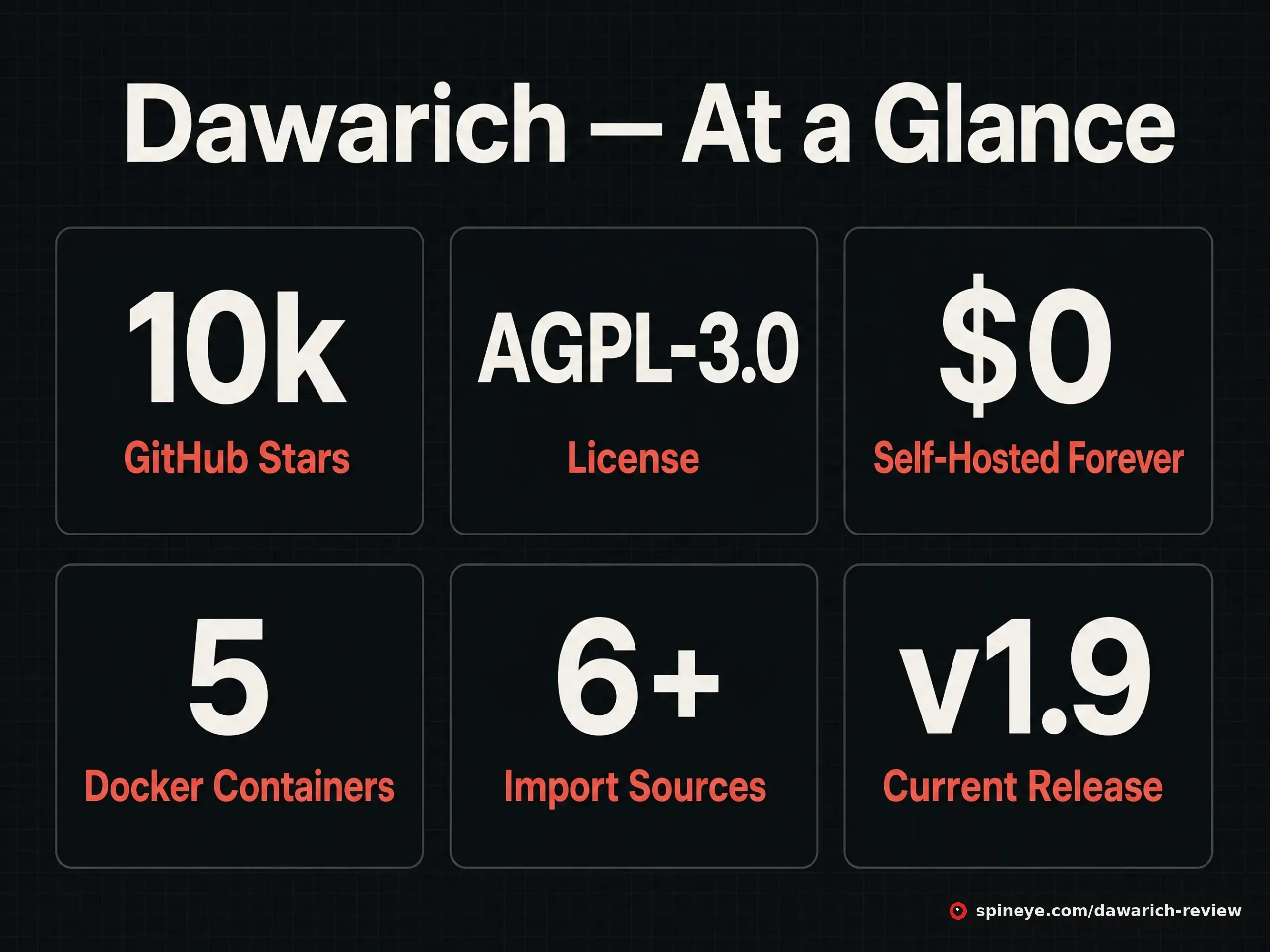
| Self-hosted price | Free — all Pro features included |
| Cloud price | Lite €59.99/yr · Pro €179.99/yr · Family €299.99/yr (7-day trial, 14-day refund) |
| License | AGPL-3.0 |
| Community | ~10,000 GitHub stars, 348 forks |
| Install | Docker Compose (app, database, Sidekiq, Redis); Synology supported |
| Imports | Google Maps Timeline, OwnTracks, Strava, Immich, GPX, GeoJSON, photo EXIF |
| Tracking apps | Official iOS & Android apps, plus Overland, OwnTracks, GPSLogger, PhoneTrack, Home Assistant |
| Export | GPX and GeoJSON, one click |
What It Looks Like
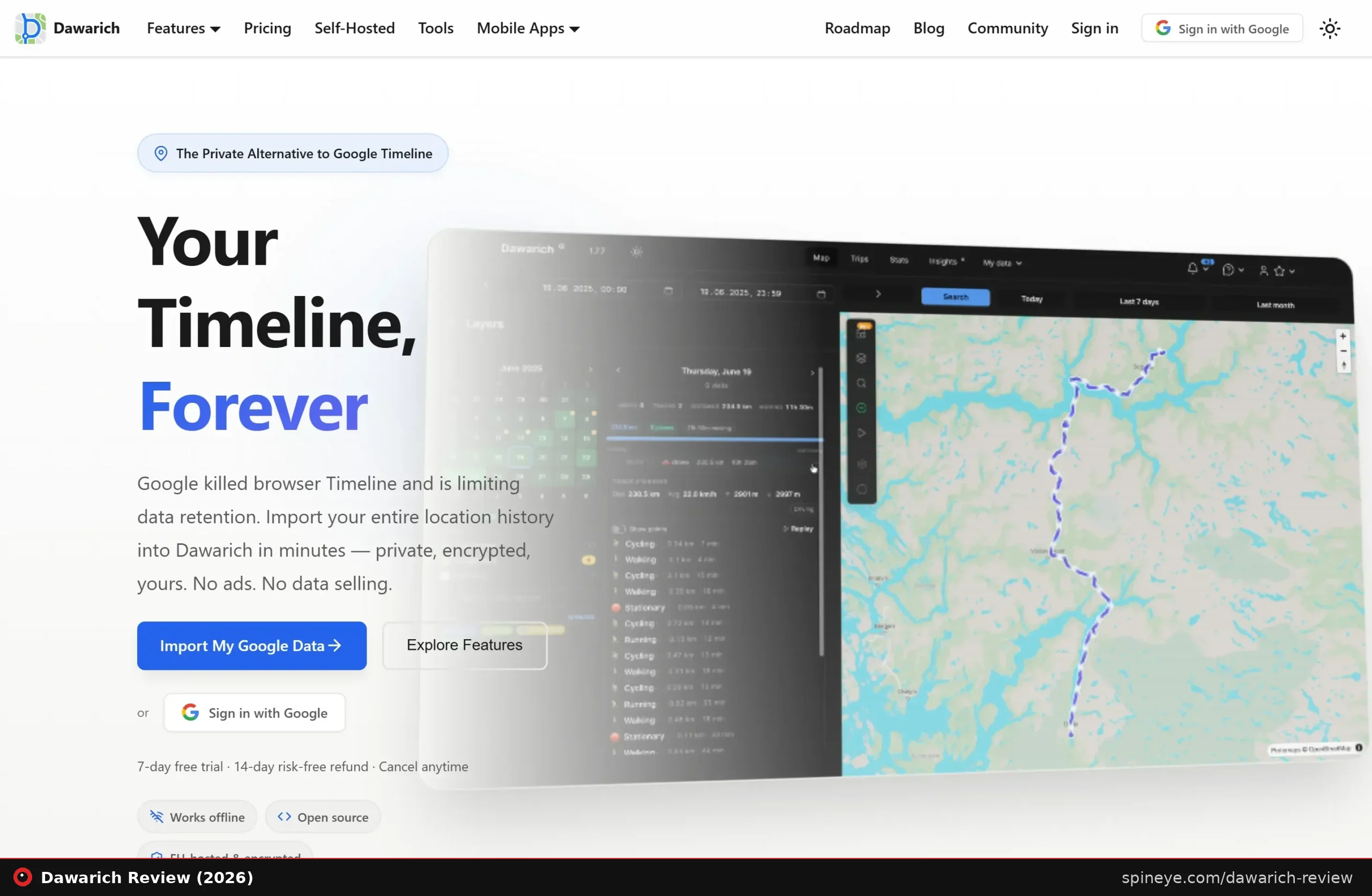
The map is the centre of the app: routes coloured by speed, a heatmap layer, a “fog of war” view that reveals only where you have actually been, and a 3D globe. Alongside it sits a daily breakdown splitting your movement into cycling, walking, running and stationary segments with distance and duration per leg. A recent release added transport-mode editing, which one user welcomed with relief: “was getting tired of all my walks showing up as car trips.”
Self-Hosted or Cloud: the Real Cost
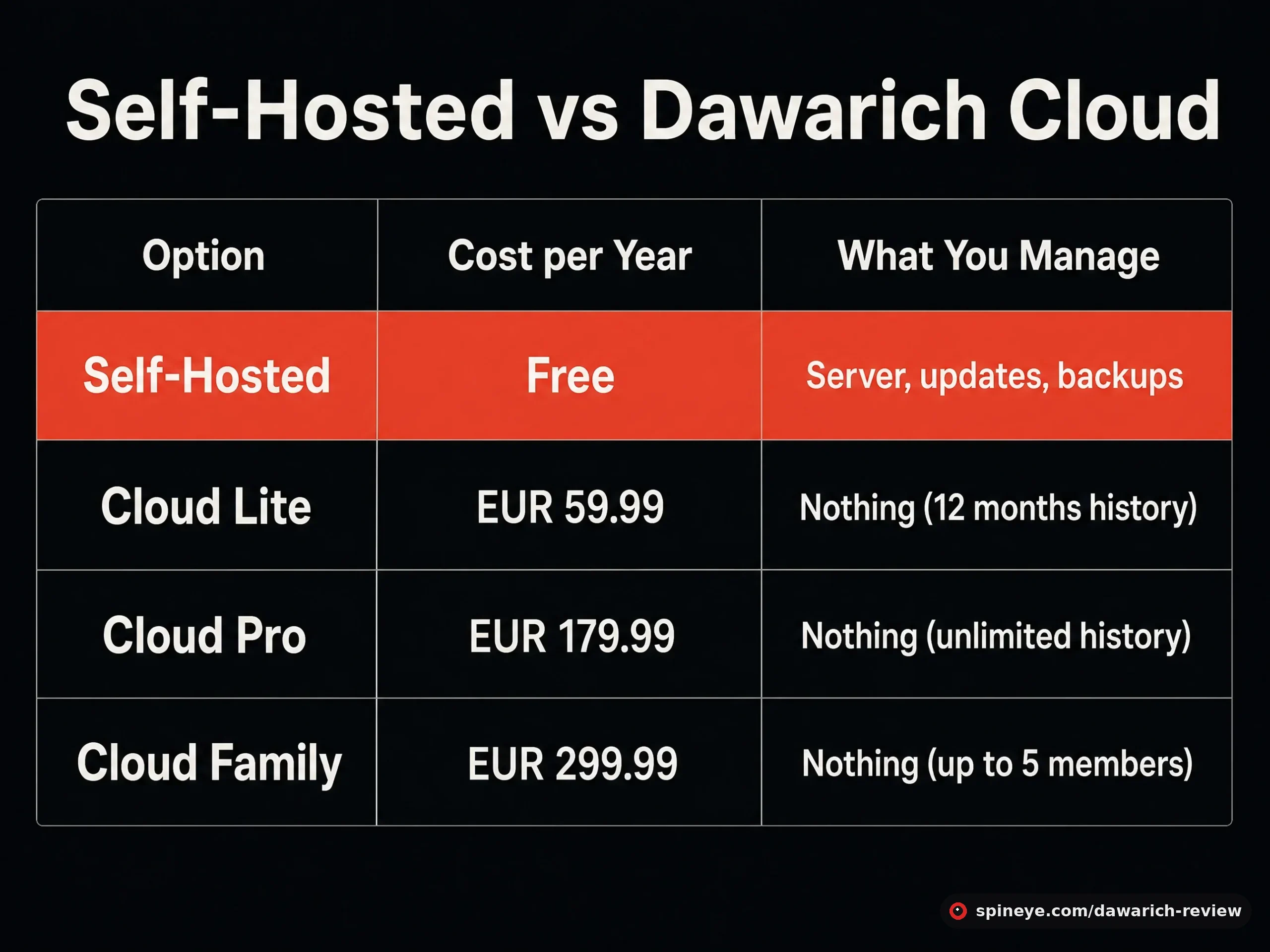
This is where most reviews stop at “it’s free” and miss the point. Self-hosting genuinely costs nothing and unlocks every Pro feature — but Dawarich is not a single lightweight container. The developer said so plainly when a user suggested it should be lighter:
“Unfortunately, Dawarich is not as lightweight as you feel it should be. You can’t do much without the database container, the app itself, and background jobs. For Sidekiq to work, Dawarich uses a Redis container…”
Freika, developer, r/selfhostedHe has also acknowledged the memory footprint directly, noting Dawarich is written in Ruby — “an interpreted language and thus a memory-intensive one” — and that improving it is a gradual project. If your server is a Raspberry Pi already running six other services, budget accordingly.
The cloud tiers exist for people who want the app without the sysadmin work. At €179.99/year for unlimited history, Pro is not cheap next to a free self-hosted instance — but it buys managed backups, EU hosting and no 3am container debugging. The Lite tier’s 12-month viewing limit is worth reading twice: your full data is still exportable, but you only browse the last year.
Importing Your Google History
Migration is the feature most people arrive for, and it works — with a caveat about volume. Google hands you a Takeout archive containing one JSON file per month. Inside, the folder you want is “Semantic Location History,” split by year and month; you select all the monthly files at once on Dawarich’s import page and upload them together.
Users routinely report importing a decade or more. One described holding “1.1 million geopoints” going back to 2015. Expect the import and subsequent processing to take a while on modest hardware, and expect to review “suggested” visits afterwards — one user found roughly 3,000 suggestions queued after a Google import and asked for a bulk-confirm option.
What Real Users Report
Dawarich has an unusually long public track record: release threads on r/selfhosted going back to April 2024, each with dozens to hundreds of comments. The tone is consistently warm, and specific.
“Dawarich, along with Immich, are my two top self hosted apps. Dawarich ever since Google Timeline’s collapse has had my rough location data since 2015. 1.1 million geopoints! Been self hosting it on my k8s infra ever since it came out, super happy.”
r/selfhosted commenter, March 2026“I’ll be honest, Dawarich was something I spun up maybe 4-5 months ago and fully expected to delete it after a week or two. Now I check it almost everyday.”
r/selfhosted commenter, December 2024“Just switched from Reitti to Dawarich… way more feature rich and works even better. Frontend style on home site could be improved tho.”
r/selfhosted commenter, March 2026That last critique lands close to home, and the developer has been disarming about it: “I’m a backend developer and I really don’t like frontend, so there’s that.” The 1.0 release and a rebuilt timeline view have since improved things considerably.
The recurring complaints are worth knowing before you commit:
- Android battery drain. Users struggle to find a tracking configuration that neither drains the battery nor logs too sparsely. Several settled on OwnTracks or GPSLogger with tuned intervals rather than continuous tracking.
- Unraid setup friction. More than one user reported the community Unraid template causing trouble and asked for an official one.
- Occasional stray points. A user found his timeline claiming he’d been to Honduras — phones latch onto odd cell towers, and cleaning those points up takes manual work.
- iOS tracking indicator. The persistent location icon is an Apple platform behaviour, not a Dawarich bug; one user works around it with location-based Shortcuts.
On the positive side, offline handling is genuinely robust. One user reported his iPhone holding 435,000 points while away from his network, then uploading all of them successfully once home.
Dawarich vs the Alternatives
| Option | Cost | Self-hostable | Best at |
|---|---|---|---|
| Dawarich | Free self-hosted / from €59.99 cloud | Yes | Timeline replacement: history, trips, stats, photos |
| Google Timeline | Free | No | Zero setup — buton-device only, with retention limits |
| Traccar | Free / paid cloud | Yes | Fleet and live vehicle tracking |
| OwnTracks | Free | Yes | The tracker itself — often feeding Dawarich |
| Life360 | Freemium | No | Family location sharing and alerts |
The comparison people ask for most often on Reddit is Life360, and it is the one place Dawarich’s fit is imperfect. Dawarich added family sharing, but Life360 is built around live family safety with driving alerts and SOS — a different job. Traccar came up repeatedly too, with one user judging it “not nearly as feature rich” for personal timeline use. If you want a history you own, Dawarich wins; if you want real-time family safety features, look elsewhere.
Pros and Cons
Pros
- Free self-hosted with every Pro feature unlocked
- Imports a decade-plus of Google Takeout history
- Official iOS and Android apps plus six third-party trackers
- Robust offline buffering — hundreds of thousands of points sync later
- Immich and PhotoPrism integration puts photos on your timeline
- Two years of visible, responsive development and a candid maintainer
- One-click GPX/GeoJSON export — no lock-in
Cons
- Five containers and a memory-hungry Ruby stack — not Pi-friendly
- Explicit “do not auto-update” warning; breaking changes happen
- Android battery tuning takes trial and error
- Unraid setup reported as fiddly
- Stray GPS points need manual cleanup
- Cloud Pro at €179.99/year is steep beside a free self-hosted install
Should You Self-Host It?
Who It’s For — and Who Should Skip It
Best for:
- Anyone who exported their Google Takeout archive and wants that history to outlive Google’s retention policy
- Self-hosters already running Docker — especially Immich users, given the photo integration
- Frequent travellers who want per-country day counts and trip journeys
- Privacy-minded people who want the database on their own disk
Skip it if:
- Your only hardware is a Raspberry Pi carrying other services
- You want live family-safety features — that is Life360’s territory
- You would rather not read release notes before updating a container
Getting Started
Self-hosting starts with the Docker Compose file in the repository: docker compose -f docker/docker-compose.yml up, then open port 3000. The demo login is demo@dawarich.app / safepassword — change it immediately. If you would rather skip all that, the hosted plans include a 7-day trial and a 14-day money-back guarantee.
Final Verdict
Dawarich does the thing self-hosted software so often promises and rarely delivers: it fully replaces a commercial service people actually miss. Two years of public releases, a maintainer who answers in his own threads, and users with million-point archives make the case better than any feature list. The deductions are honest ones — it is heavier than it looks, updating demands attention, and the mobile tracking still needs tuning. Know that going in and it is one of the most rewarding things you can run on a home server.
Frequently Asked Questions
Is Dawarich free?
Self-hosting is completely free and includes every Pro feature. Managed cloud plans start at €59.99 per year for Lite, €179.99 for Pro with unlimited history, and €299.99 for a five-member Family plan.
Can Dawarich import my Google Maps Timeline?
Yes. Export via Google Takeout, then upload the monthly JSON files from the “Semantic Location History” folder on Dawarich’s import page. Users regularly import a decade or more of history this way.
How heavy is Dawarich to self-host?
Heavier than it looks. It runs as several containers — the app, a database, Sidekiq background jobs and Redis — and the Ruby codebase is memory-intensive by the developer’s own admission. A small NAS or a VPS handles it; a busy Raspberry Pi may struggle.
Is it safe to update Dawarich automatically?
No — the project explicitly advises against it. Development is fast and breaking changes occur, so read the release notes, back up first, and never delete your original imported data.
Which phone apps work with Dawarich?
There are official iOS and Android apps, plus support for Overland, OwnTracks, GPSLogger, PhoneTrack and Home Assistant. All supported clients buffer data offline and upload once they reach your server.
Does Dawarich drain your phone battery?
It can, depending on how aggressively your tracker polls. This is the most common complaint from Android users, who typically tune the interval in OwnTracks or GPSLogger rather than tracking continuously.
Can I get my data back out?
Yes — one-click export to GPX and GeoJSON, and there is an API. Even on the Lite cloud plan, which limits browsing to 12 months, exports include your complete data.
What does the name Dawarich mean?
It is German: “Da war ich” — “I was there.” Fitting for a location-history app, and a detail many users take months to notice.
Sources
- Dawarich GitHub repository — features, install method, imports, update warnings, license
- dawarich.app — cloud pricing, feature tiers, privacy claims
- r/selfhosted release threads: April 2024 launch, 2024 review, version 1.0, 1.6.0, 1.9.1 — user reports and developer replies
- Traccar and OwnTracks — comparison data
If you’re assembling a self-hosted stack around this, our Brows3 review covers the free S3 browser that pairs well with your backup buckets, and the shared-to-cloud migration guide walks through moving to infrastructure that can actually host services like Dawarich. More finds like this land in the Spineye blog and our reviews section.