
This Next Player review came out of a Reddit thread asking a simple question: which app is underrated? Someone answered with a name, someone else asked for a link, and that was the whole exchange. It is not much of a recommendation — until you search for the app and find that in a category as crowded as Android video players, this one has 4,200 GitHub stars and not a single independent review.
Ben-G — independent reviewer at Spineye. Reviews are research-based: documentation, release notes, community discussions and real user reports, with sources linked. Where I’ve used a tool hands-on, I say so explicitly. How we review · LinkedIn
Verdict: a genuinely modern Android video player — Material 3, gesture-driven, format-complete, free and without ads or tracking. The reasons to hold back are stated by the developer himself: it is still in active development and expected to have bugs, and it is one person’s project.
What Next Player Is
Next Player is a native Android video player written in Kotlin by developer Anil Beesetti. It is built on Media3 — the same ExoPlayer engine that underpins a large share of Android’s video stack — with a Jetpack Compose interface following Material 3.
The pitch is straightforward: play everything, look modern, cost nothing, show no ads, ask for no unnecessary permissions. In a category where the best-known free option has spent years adding advertising, that combination is less common than it should be.
| Spec | Detail |
|---|---|
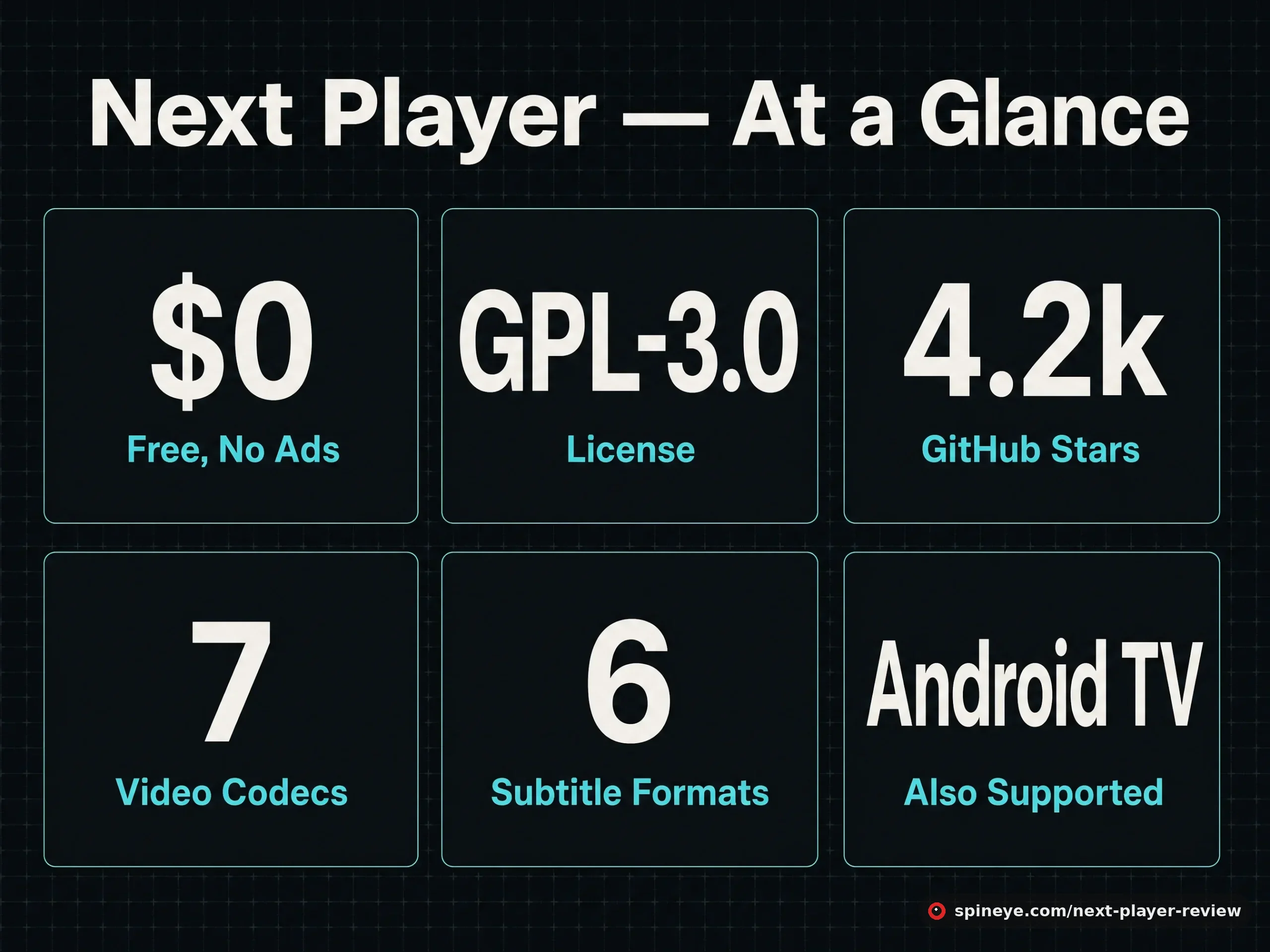
| Price | Free — no ads, no in-app purchases, no tracking |
| License | GPL-3.0, fully open source |
| Community | 4,200 stars, 296 forks, 2,349 commits |
| Install | Google Play, F-Droid, IzzyOnDroid, or GitHub releases |
| Video formats | H.263, H.264, H.265 HEVC, MPEG-4 SP, VP8, VP9, AV1 (device-dependent) |
| Audio formats | Vorbis, Opus, FLAC, ALAC, PCM/WAVE, MP1–MP3, AMR, AAC, AC-3, E-AC-3, DTS, DTS-HD, TrueHD |
| Subtitles | SRT, SSA, ASS, TTML, VTT, DVB |
| Also runs on | Android TV |
What You Actually Get
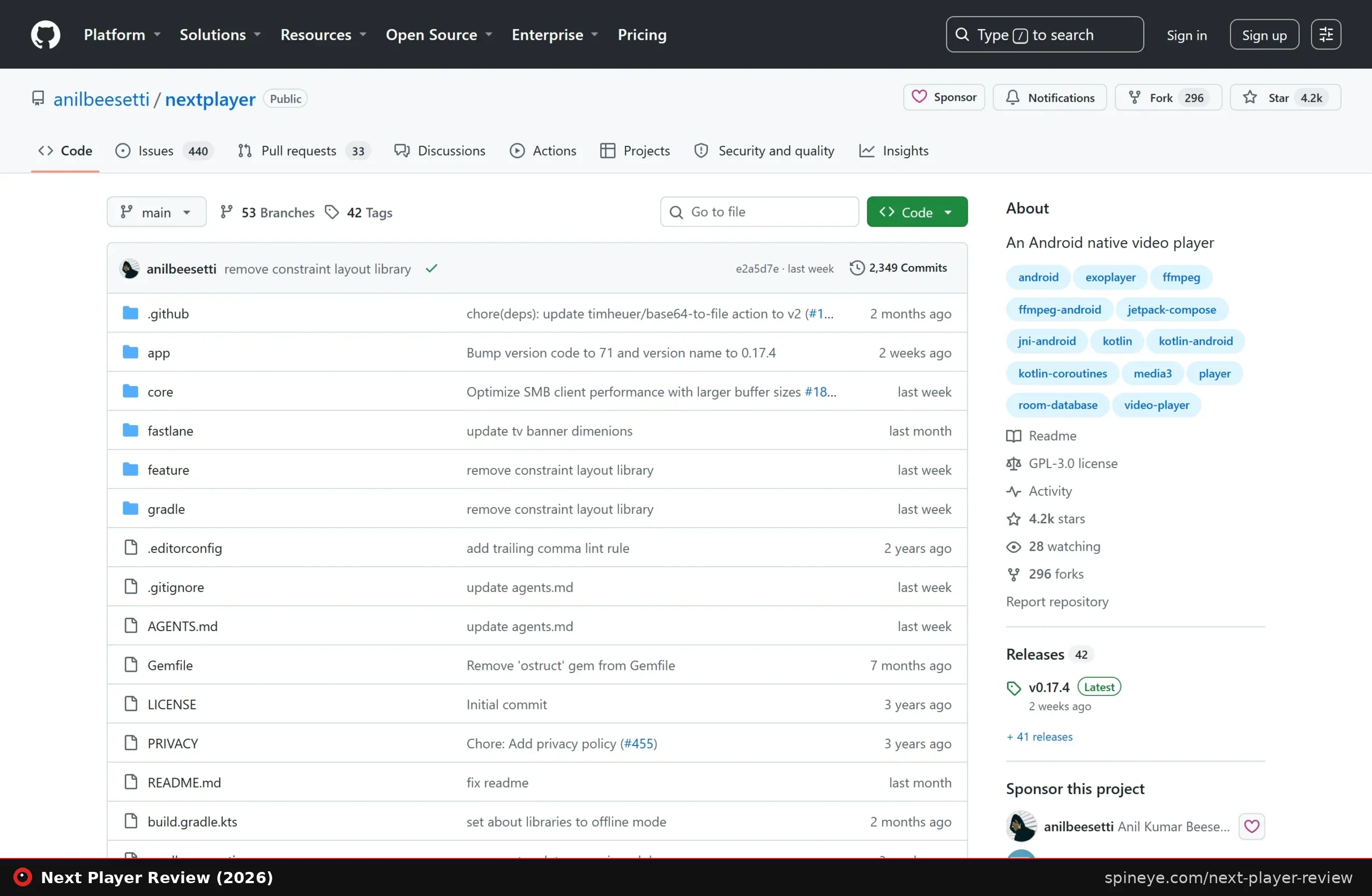
The feature list reads like someone catalogued every small frustration in mobile video playback and fixed them one at a time:
- Gesture control that matches muscle memory. Swipe up and down on the left for brightness, on the right for volume, horizontally to seek. Pinch to zoom. It is the layout most people already expect, done consistently.
- Resize options that go beyond fit-or-fill — fit, stretch, crop and true 100% — plus volume boost for quiet recordings.
- Real subtitle handling: external subtitle files, delay adjustment, and six formats. The repo is honest that SSA/ASS styling support is limited, which matters for anime subtitles with heavy typesetting.
- Network playback over SMB, FTP, SFTP and WebDAV — so a NAS or home server plays directly without syncing files to the phone first.
- Picture-in-picture and background playback, plus a controls lock so a stray touch does not skip your film.
- A media picker with three views — tree, folder and file — which sounds trivial until you have a messy download directory.
The network-storage support is the quietly important one. It puts Next Player in the same conversation as a self-hosted media stack: point it at a share and your library plays without a server-side transcoding step.
What the Community Says
There is not much of it, and that is the point. Next Player surfaced in exactly the kind of thread we look for — someone asking which apps deserve more attention, and a stranger answering with a name.
“Can you give me link for next player” — followed immediately by another user posting the GitHub URL.
Exchange in “which app is underrated as per you guys?”, r/androidapps, August 2025It also appeared in a “best apps I found this year” round-up thread with 579 upvotes. That is the entire public conversation we could find: two mentions, both from users rather than the developer, no marketing push, no launch campaign. For a project with 4,200 stars and over 2,300 commits, that gap between usage and coverage is unusual.
Next Player vs the Alternatives
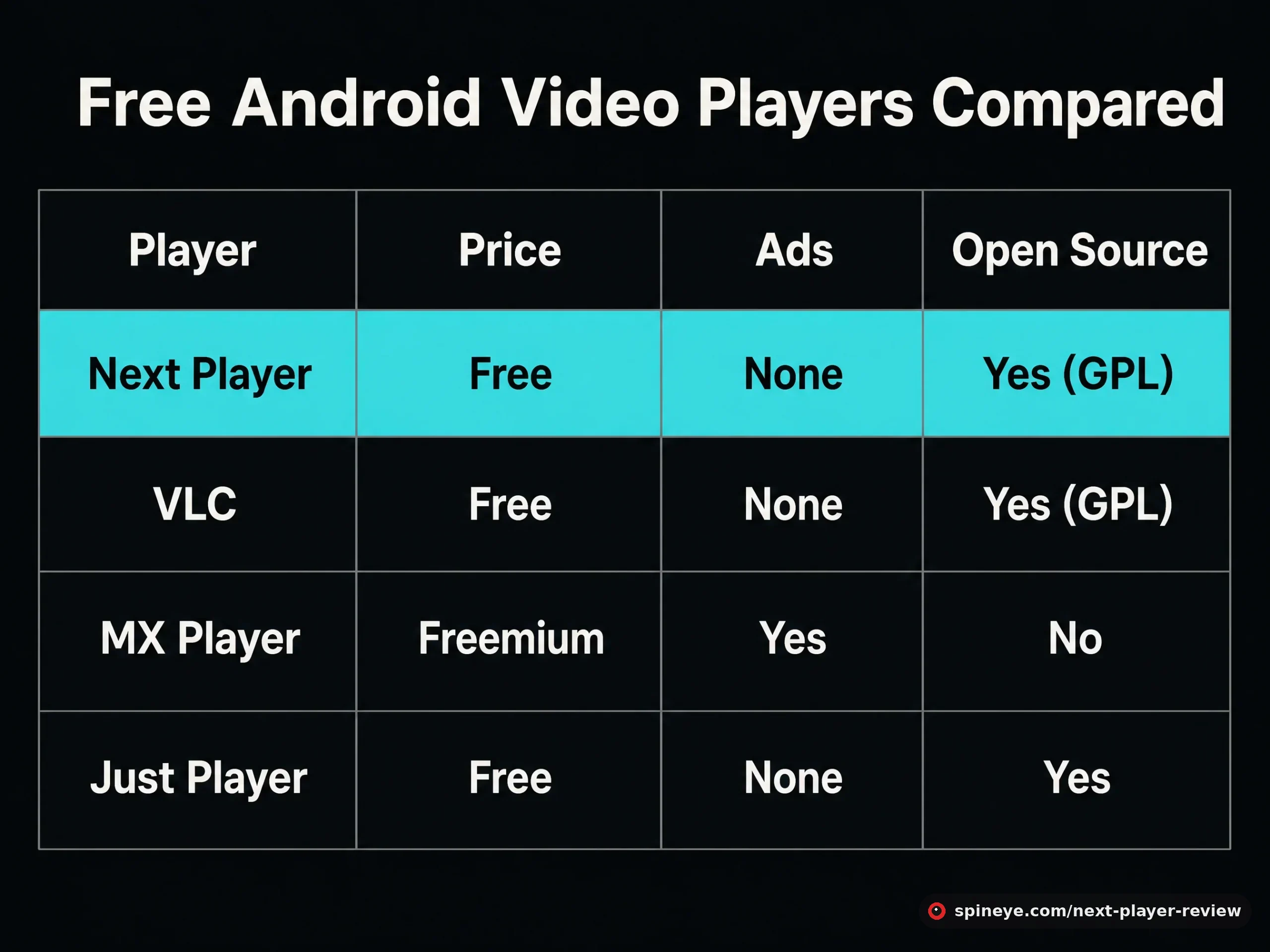
| Player | Price | Ads | Open source | Character |
|---|---|---|---|---|
| Next Player | Free | None | Yes (GPL-3.0) | Modern Material 3 design, gesture-first |
| VLC | Free | None | Yes (GPL) | Plays anything; mature, but the interface shows its age |
| MX Player | Freemium | Yes | No | Feature-rich, now heavily monetised |
| Just Player | Free | None | Yes | Minimalist, also Media3-based |
VLC remains the safe answer and will stay that way: a decade of hardening and a foundation behind it beat any solo project on reliability. What VLC does not have is a modern Android interface, and that is the entire reason Next Player exists. MX Player was once the default recommendation and lost that position to advertising. Just Player is the closest sibling — same engine, deliberately fewer features.
Put plainly: choose VLC if you want the thing that has never let anyone down. Choose Next Player if you want a player that feels like it was designed this decade and you can live with a young project.
Pros and Cons
Pros
- Free, GPL-licensed, no ads and no tracking
- Material 3 interface — genuinely modern for this category
- Broad codec support including HEVC and AV1
- Network playback over SMB, FTP, SFTP and WebDAV
- Thoughtful gestures, resize modes and volume boost
- Available on F-Droid and IzzyOnDroid, not only Google Play
- Android TV build included
Cons
- Developer states it is still in development and expects bugs
- One maintainer — the usual bus-factor risk
- Limited SSA/ASS subtitle styling, which anime viewers will notice
- Codec support depends partly on your device’s hardware
- No independent reviews to cross-check against
- VLC is more battle-tested if reliability outranks design
Which Player Fits You?
Who Should Install It — and Who Shouldn’t
Best for:
- Anyone still on MX Player who resents the advertising
- People who stream from a NAS or self-hosted share and want direct SMB playback
- F-Droid users who prefer open-source apps with no trackers
- Android TV owners wanting a clean, free player
Skip it if:
- You watch heavily typeset anime subtitles — the SSA/ASS limitation is real
- You need something you never have to think about; VLC has earned that
- You are uncomfortable running software its own author labels as work in progress
Getting It
Next Player is on Google Play, F-Droid, IzzyOnDroid and as an APK from GitHub releases. F-Droid is the choice if you want builds from source with no Play Services involved. Nothing to buy, nothing to unlock — starring the repository is the only thanks the developer collects.
Final Verdict
Next Player answers a question plenty of people have quietly given up on: is there a free Android video player that is genuinely pleasant to use and does not sell you something? Modern design, complete format support, real network playback and no advertising, from one developer, for nothing. It sits below the top mark only because its author is candid that it is still maturing — and because in this category, VLC’s decade of reliability is a real argument. Try it; the cost of finding out is zero.
Frequently Asked Questions
Is Next Player free?
Yes — completely free, GPL-3.0 licensed, with no advertising, in-app purchases or tracking. There is no paid tier to upgrade to.
Which video formats does Next Player support?
H.263, H.264 AVC, H.265 HEVC, MPEG-4 SP, VP8, VP9 and AV1, though actual playback depends partly on your device’s hardware decoders. Audio support is broad, including FLAC, ALAC, Opus, AC-3, E-AC-3, DTS, DTS-HD and TrueHD.
Can Next Player stream from a NAS?
Yes. It supports network storage over SMB, FTP, SFTP and WebDAV, so files on a home server play directly without copying them to the phone.
Is Next Player better than VLC?
It is more modern to use; VLC is more proven. VLC has years of hardening and an organisation behind it, while Next Player offers a Material 3 interface and gesture controls that feel current. For everyday viewing either works — pick on design or on reliability.
Does Next Player handle anime subtitles?
Partly. It supports SSA and ASS files, but the repository states styling support is limited, so heavily typeset subtitles may not render as intended.
Is Next Player safe to install?
The source is public under GPL-3.0 with more than 2,300 commits, and it is distributed through F-Droid, which builds from source. It requests no excessive permissions and contains no trackers or ads.
Does it work on Android TV?
Yes, an Android TV version is included in the project.
Who develops Next Player?
Anil Beesetti, a single developer, maintaining it openly on GitHub. That is worth knowing both as a credit and as a risk: solo projects depend on one person’s continued time.
Sources
- Next Player GitHub repository — features, formats, license, development status
- F-Droid listing — build and permissions information
- r/androidapps: “which app is underrated as per you guys?” — where we found it
- VLC for Android and Just Player — comparison data
This one came out of our second scan — we explain the method, and why the quietest threads produce the best finds, in our research write-up. If you play files from a home server, our Dawarich review and Brows3 review cover two more tools from the same world. More in the Spineye blog and our reviews section.