

This article contains affiliate links. Purchases through these links may earn us a commission at no extra cost to you.
This TubeOnAI review starts with the answer most buyers want. The lifetime deal is good value if you summarise YouTube videos with the default AI model. It is much weaker if you mainly feed it podcasts or uploads. The reason is the credit system, and the numbers below show exactly where the line falls.
Based on TubeOnAI’s own credit documentation and pricing, the AppSumo listing with its 47 verified reviews and 160 questions, Trustpilot, the app stores, and a Reddit discussion among lifetime-deal buyers. Alternatives are priced from their own pricing pages. Last updated: September 2026.
TubeOnAI review verdict (2026)
TubeOnAI is a capable all-in-one summariser for YouTube, podcasts, PDFs and articles, with channel auto-summaries and a repurposing studio on top. Buyers rate it 4.13 out of 5 on AppSumo, but 12 of 47 reviews give three tacos or fewer, mostly over failed jobs and credits.
Key Takeaways
- The AppSumo deal costs $59, $149 or $379 once, for 3,000, 10,000 or 60,000 credits a month, with a 60-day refund. (AppSumo)
- One credit equals $0.001 of AI cost. A 10–20 minute YouTube video averages 33 credits; a 60-minute podcast costs 180–250. (TubeOnAI [1])
- Credits reset every month and do not roll over; failed jobs are refunded automatically, according to the maker. (TubeOnAI [1])
- Independent ratings sit well below the 4.9 from 500 reviews on TubeOnAI’s own site: 3.9 on Trustpilot and Google Play, 4.13 on AppSumo. (Trustpilot [7], AppSumo [5])
- Free NotebookLM already handles YouTube links, PDFs and audio; TubeOnAI’s edge is automation: channel auto-summaries, repurposing and scheduling. (Google [11], Reddit)
1What is TubeOnAI?
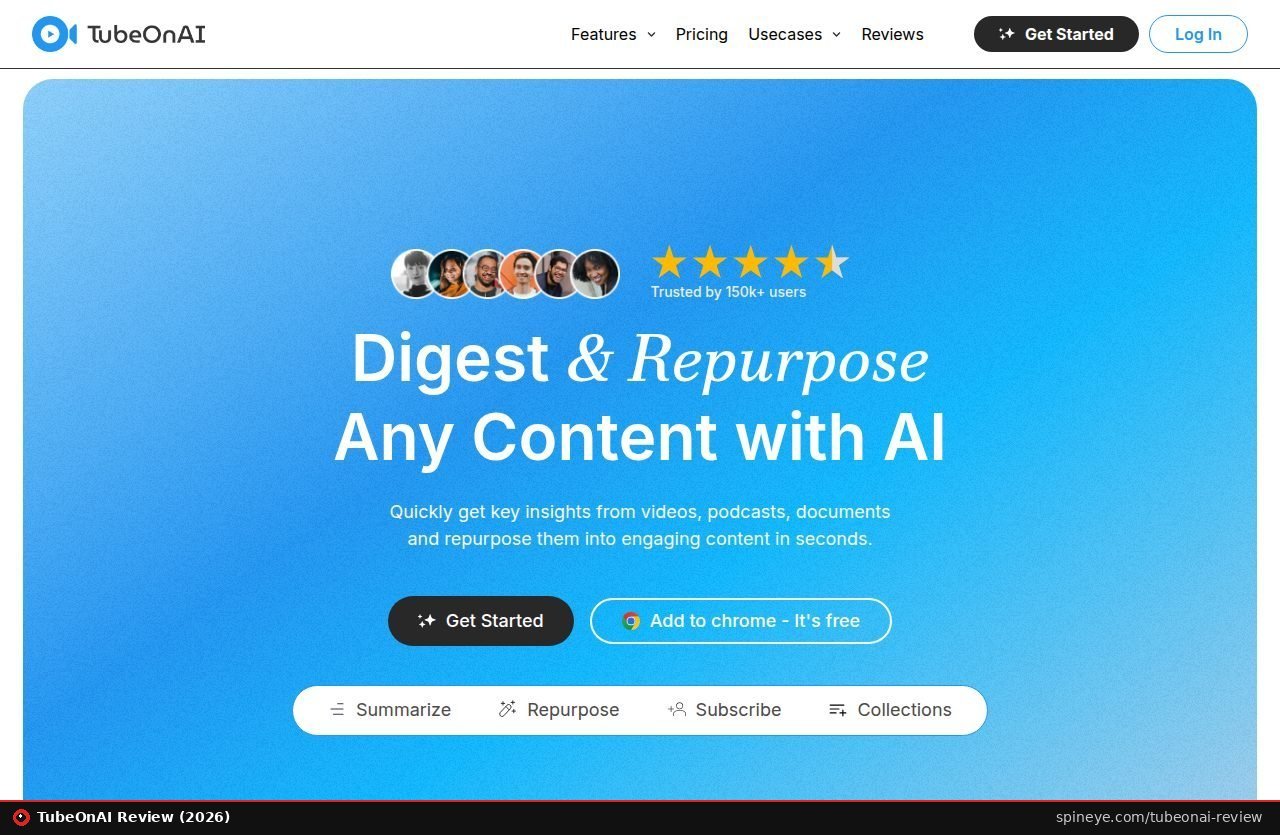
TubeOnAI is an AI summariser for YouTube videos, podcasts, PDFs, web articles and short-form video. It turns each source into a summary you can question, translate into 40+ languages or repurpose into blogs, threads, newsletters and scripts. It can also summarise new uploads from channels you follow automatically.
You paste a link or upload a file, pick a language and detail level, and get a structured summary. From there you can ask follow-up questions, generate a mind map, quiz or flashcards, or repurpose the summary with one of 150+ templates or your own prompt. On the lifetime deal, interactive content such as quizzes and flashcards is reserved for Tier 3 (AppSumo).
Supported sources are broad. They include YouTube, Spotify and Apple podcasts, RSS feeds, Google Drive, and uploads in MP4, MP3, PDF, DOCX, PPTX and TXT up to 100 MB. Since February the list also covers TikTok, X, Instagram Reels, Snapchat, Pinterest and Threads videos (AppSumo founder updates). It works on the web, as a Chrome extension, and in iOS and Android apps. Translation into 40+ languages is built in; if you only need to translate text on a Mac, a free tool like Easydict is lighter.
What changed in 2026
The founders have shipped steadily this year. A Chrome extension and six new video sources arrived in February. Social scheduling to WordPress, LinkedIn and Bluesky followed in March, with Facebook and X listed as “coming soon”. In April came infographic and flowchart generators plus embeddable quizzes. This is also a returning deal. TubeOnAI ran on AppSumo before and came back in September with BYOK (bring your own AI key), playlist-level bulk summaries and an “agentic” Ask AI across your library.
The company was founded in March 2023, is bootstrapped and has 1–10 people, according to its AppSumo profile. Ask AI across a whole collection is the same idea behind note-takers like Prismical, which applies it to meetings rather than videos. If you need raw transcripts instead of summaries, our Scriberr review covers a self-hosted alternative for audio.
2How far do TubeOnAI credits go?
Credits depend on three things: content length, the AI model, and whether the source has captions. YouTube is cheapest because TubeOnAI uses its free captions. Podcasts and uploads need paid transcription, which adds about 177 credits per job. That makes a one-hour podcast roughly four to five times as expensive as a one-hour video.
The model choice matters even more than length. For a 60-minute YouTube video, TubeOnAI’s own table lists about 5 credits on gpt-5-nano, 16 on gpt-5-mini, 68 on gpt-5, 96 on Claude Sonnet 4.5 and 107 on gpt-5.1. That is a spread of about 21 times. Repurposing an existing summary into a blog post costs about 4 credits on nano and 18 on mini (TubeOnAI [1]).
One caution: the guide is not fully consistent. Its per-length table lists about 51 credits for a 30–60 minute video on the default model, while its per-model table says 16 for a 60-minute one. The calculator below uses the higher per-length averages, so it errs on the safe side.
3What do users say about TubeOnAI?
Most buyers like the time savings, the channel auto-summaries and the searchable library. The recurring complaints are failed jobs (“Unable to Process”), credits taken for summaries that did not complete, slow support at times, and a limited API. Ratings range from 4.13 on AppSumo to 3.0 for the young Chrome extension.
TubeOnAI’s “user reviews” page claims 4.9 stars from 500 reviews, without saying where those reviews come from. On AppSumo, 30 of 47 buyers give five tacos and five give one. The positive reviews are consistent. One buyer calls it “a must-have” for content creators. Others describe it growing into a personal knowledge system with fair credit usage, and several praise the automated channel workflows (AppSumo reviews [5]).
Where it goes wrong
Two one-taco reviews from 22 July report the same problem: “Unable to Process” errors on both web and mobile, with credits deducted for videos that were never summarised. One reviewer called it “a waste of both time and money”. In February, a buyer asked why an auto-summary ran twice and charged double credits. The founder asked them to contact support so the team could investigate (AppSumo Q&A [6]). The maker’s guide now says failed jobs are refunded automatically and duplicates within 30 seconds are blocked. That is the right fix, but it is the maker’s claim, so check your usage history in the first weeks.
Other criticism is about direction. One April reviewer accused the company of removing API access and credit rollover for earlier customers. A September three-taco review says limited API support for media formats is “a significant bottleneck” for automation pipelines. On Trustpilot, one subscriber reported being unable to cancel for three months (Trustpilot [7]). The latest reviews are more balanced. A four-taco review from 24 September praises the auto-summaries and library Q&A but still mentions a language bug and raw JSON output.
The Reddit debate: keeper or nice-to-have?
A thread in r/appsumo asks the question every buyer faces. The poster likes the summaries, slide decks and flashcards, but worries that auto-summarising every channel really needs the $379 top tier. The replies split. A user of more than a year says the platform keeps maturing and the API is “great”. Others argue that NotebookLM covers most of it.
“I like the tool but think it is one of those nice to have purchases.”— a Tier 3 buyer, r/appsumo, March 2026
A later commenter was harsher, saying the interface becomes unresponsive with many channels. Reddit remains the best place to hear from long-term users of small tools. We read hundreds of such threads for our hidden-gem software research. This one fits the pattern: loyal fans, plus a vocal group that wants the basics to be rock-solid first.
4How much does TubeOnAI cost in 2026?
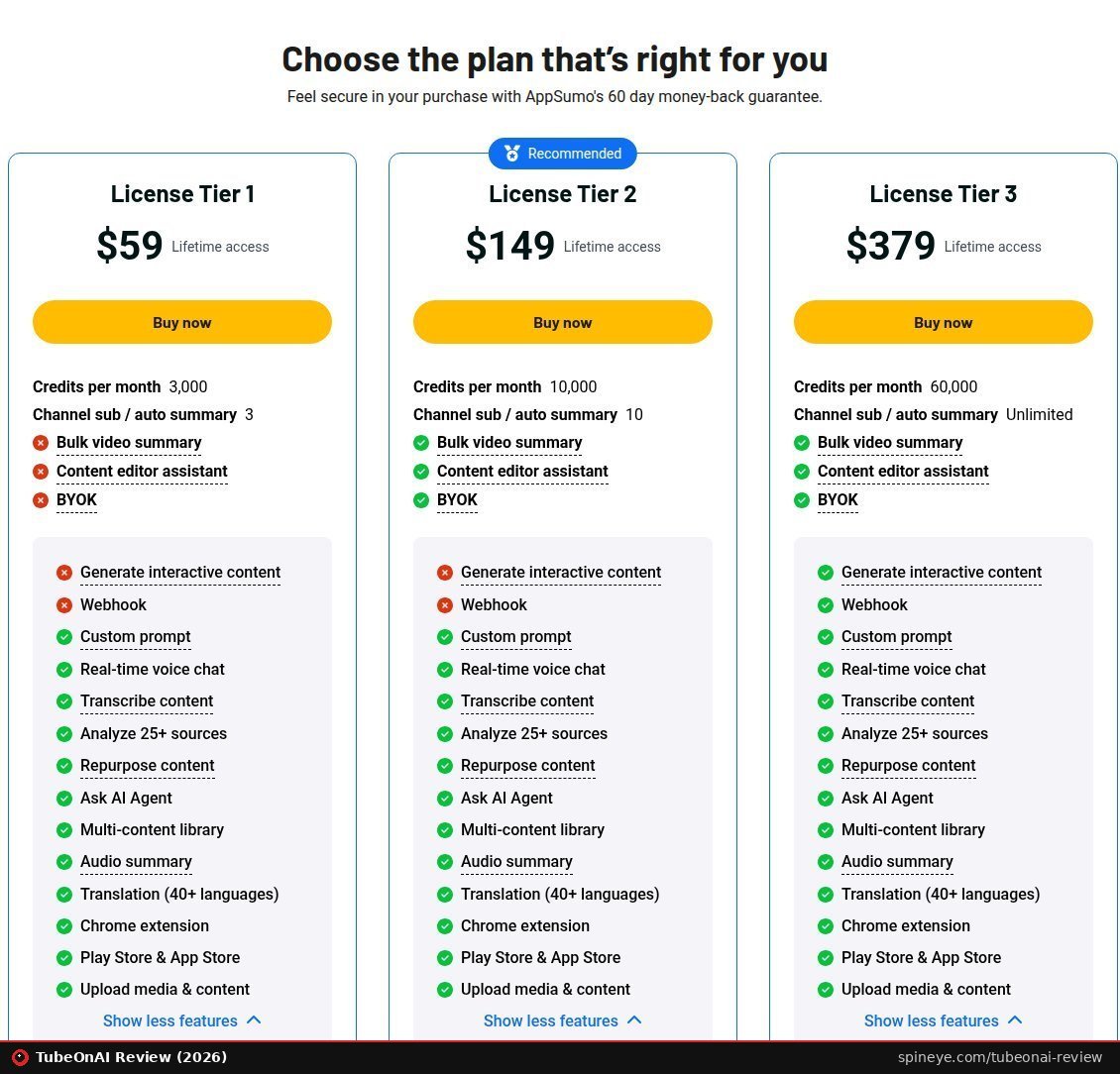
On AppSumo, TubeOnAI costs $59 (Tier 1), $149 (Tier 2) or $379 (Tier 3) once, with a 60-day refund. Regular plans start free with 400 credits, then $9 a month for Essential and $19 for Pro. On the deal, BYOK and bulk summaries start at Tier 2; webhooks and interactive content are Tier 3 only.
| AppSumo tier | Price (list) | Credits / month | AI value / month | Auto-summary channels |
|---|---|---|---|---|
| Tier 1 | $59 ($108) | 3,000 | $3 | 3 |
| Tier 2 | $149 ($324) | 10,000 | $10 | 10 |
| Tier 3 | $379 ($2,160) | 60,000 | $60 | up to 500 |
Sources: AppSumo and the credit guide [1], checked 24 September 2026. AppSumo labels Tier 3 channels “Unlimited”; the maker’s guide says 500.
What each tier leaves out
| Feature | Tier 1 | Tier 2 | Tier 3 |
|---|---|---|---|
| Summaries, repurposing, custom prompts, Ask AI, translation | ✓ | ✓ | ✓ |
| Chrome extension and mobile apps | ✓ | ✓ | ✓ |
| Bulk video (playlist) summaries | – | ✓ | ✓ |
| Content editor assistant | – | ✓ | ✓ |
| BYOK (your own AI key) | – | ✓ | ✓ |
| Interactive content (quizzes, flashcards) | – | – | ✓ |
| Webhook | – | – | ✓ |
Source: AppSumo plan cards, checked 24 September 2026.
This explains the Reddit poster’s feeling that the tool only gets “truly useful” at the top tier. Tier 1 is a summariser with repurposing. The automation extras that make TubeOnAI different from free tools arrive at Tier 2 (bulk summaries, BYOK) and Tier 3 (webhooks, interactive content).
| Subscription plan | Monthly | Yearly | Credits / month | Channels |
|---|---|---|---|---|
| Starter | Free | – | 400 | 3 |
| Essential | $9 | $80 | 10,000 | 25 |
| Pro | $19 | $170 | 20,000 | Unlimited |
| Enterprise | $29 | $260 | Unlimited | Unlimited |
Source: TubeOnAI pricing page, checked 24 September 2026. The help centre shows a different plan table, so confirm at checkout.
Compared on paper, the maths is straightforward. The $149 Tier 2 gives the same 10,000 monthly credits as the $80-a-year Essential subscription, so it pays for itself in just under two years. The $59 Tier 1 gives less than a third of that credit budget. It pays off quickly only if 3,000 credits really cover your month. The deal terms also say you get future updates of the Essential plan (Tier 1) or Pro plan (Tiers 2–3). The same lifetime-deal logic we discussed in our Accordio review applies here: the bargain depends on the company still shipping in a few years.
From $59 once for 3,000 credits a month, with a 60-day refund. Test it on your own channels inside the refund window.
See the TubeOnAI deal
5TubeOnAI alternatives: NotebookLM, NoteGPT and Recall
NotebookLM is the free benchmark: it takes YouTube links, PDFs, audio and web pages, up to 50 sources per notebook. Recall is a read-later knowledge base with a free tier of 10 summaries a month. NoteGPT is a subscription-only toolkit from $9.99 a month. TubeOnAI’s advantage is a one-off price plus channel automation.
| Tool | Entry price | Free option | Best at |
|---|---|---|---|
| TubeOnAI (AppSumo) | $59 once | 400 credits/mo | Channel auto-summaries, repurposing, scheduling |
| NotebookLM | Free | Yes, 50 sources per notebook | Research across many sources in one notebook |
| Recall | $10/mo (yearly) | 10 summaries/mo | Saving and connecting what you read and watch |
| NoteGPT | $9.99/mo | None listed | Transcripts, slides, audio and video generation |
Sources: AppSumo, Google NotebookLM help [11], Recall pricing [12], NoteGPT pricing [13], checked 24 September 2026.
NotebookLM is the one Reddit keeps mentioning, and for good reason. It accepts public YouTube URLs, audio files, PDFs and web pages. Free users can add up to 50 sources per notebook, each up to 500,000 words or 200 MB (Google [11]). What it does not do is watch your favourite channels and summarise new uploads by itself, or push a blog draft to WordPress.
Recall suits people who want a personal library more than a content studio. NoteGPT has the broadest toolkit, but its Pro plan includes only 100 premium credits a month, and Unlimited costs $29 a month (NoteGPT [13]). If your notes live in Markdown, our v2md review covers a small app that turns voice recordings into Obsidian-ready notes.
6TubeOnAI pros and cons
TubeOnAI’s strengths are broad source support, channel auto-summaries, repurposing and scheduling in one place, and a transparent credit system. Its weaknesses are reports of failed jobs and lost credits, a limited API, credits that expire monthly, and podcast summaries that cost four to five times more than YouTube.
Pros
- Summarises YouTube, podcasts, PDFs, articles and short-form video (source)
- Auto-summarises new uploads from channels you follow (source)
- 150+ repurposing templates plus scheduling to WordPress, LinkedIn and Bluesky (source)
- Published credit costs per content type and model (source [1])
- Model choice from gpt-5-nano to Claude, plus BYOK from Tier 2 (source)
- Steady feature releases through 2026 (source)
Cons
- Reports of “Unable to Process” errors and credits taken for failed jobs (source [5])
- Limited API support for automation workflows (source [5])
- Tier 1 lacks BYOK, bulk summaries and webhooks (source)
- Credits do not roll over (source [1])
- Podcasts and uploads cost ~177 extra credits each (source [1])
- Earlier buyers complained about removed features (source)
- Own-site rating (4.9) far above independent platforms (source [7])
7Who should buy TubeOnAI?
TubeOnAI suits bloggers, newsletter writers and course creators who follow a few YouTube channels and want summaries turned into drafts. Tier 2 is the sensible default. It is a weaker buy for podcast-heavy users, automation builders who depend on an API, and anyone happy with NotebookLM.
The honest summary of this TubeOnAI review is that the product does what it promises on the happy path, and its credit maths is unusually transparent. The risks are reliability and direction. Buyers have reported failed jobs, and earlier lifetime users felt features were taken away. So use AppSumo’s 60-day refund window as a real test. Connect your actual channels, run a normal month’s workload, and check the usage history before the window closes.
Good fit: YouTube-first researchers and creators, anyone who wants summaries of new uploads in their inbox, and small teams repurposing video into blogs and social posts. Poor fit: podcast-heavy workflows on Tier 1, developers who need a complete API, and privacy-first users who prefer local tools like those in our Scriberr and Prismical reviews. Choosing what to process matters as much as which tool you use. Our Honeylog review and Nuwtonic review look at the other side, where AI tools read your content rather than summarise others’.
Tier 1 is $59 once for 3,000 credits and 3 auto-summary channels. Tier 2 is $149 for 10,000 credits and 10 channels.
Get TubeOnAI on AppSumo
About this TubeOnAI review
- Basis: TubeOnAI’s credit billing guide and pricing page, the AppSumo listing and plan cards with 47 verified reviews and 160 questions, Trustpilot, Google Play, the Chrome Web Store, and a Reddit discussion among lifetime-deal buyers.
- Alternatives: prices and limits from the official pages of NotebookLM, Recall and NoteGPT.
- Calculator: uses the maker’s published average credit costs; where its tables disagree, we used the higher figure.
- Checked: all prices and ratings on 24 September 2026.
- No score: without our own long-term test, we report community sentiment rather than a rating. How we review.
Frequently asked questions
Is TubeOnAI legit?
Yes. It is a real, actively developed product founded in 2023, with 47 verified AppSumo reviews averaging 4.13/5 and a 3.9 TrustScore on Trustpilot. Some buyers report failed jobs and support delays.
How many videos can I summarise with TubeOnAI Tier 1?
Tier 1 gives 3,000 credits a month. That is about 142 ten-minute YouTube summaries on the default gpt-5-mini model, or about 600 on gpt-5-nano, according to the maker.
Do TubeOnAI credits roll over?
No. Credits reset each month on your billing date, including on AppSumo lifetime deals. Unused credits are lost.
Is TubeOnAI better than NotebookLM?
Not for one-off research: NotebookLM is free and handles YouTube, PDFs and audio. TubeOnAI is better if you want new channel uploads summarised automatically and repurposed into posts.
Can TubeOnAI summarise podcasts?
Yes: Spotify, Apple Podcasts, RSS feeds and uploaded audio. Each needs paid transcription, so a one-hour podcast costs about 180–250 credits.
How much is the TubeOnAI lifetime deal?
On AppSumo, $59 for Tier 1, $149 for Tier 2 and $379 for Tier 3, each a one-off payment with a 60-day refund.
Sources
- TubeOnAI — Understanding TubeOnAI’s credit billing system (updated 2 Sep 2026). help.tubeonai.com/hc/tubeonai-help/articles/1779953325-understandin…
- TubeOnAI — pricing. tubeonai.com/pricing
- TubeOnAI — user reviews page. tubeonai.com/user-reviews
- AppSumo — TubeOnAI listing, plans, deal terms and founder updates (checked 24 Sep 2026). link
- AppSumo — TubeOnAI reviews (47). link
- AppSumo Q&A — “Auto Summaries ran twice for the same video and used double”. link
- Trustpilot — TubeOnAI. trustpilot.com/review/tubeonai.com
- Google Play — TubeOnAI. play.google.com/store/apps/details?id=com.tubeonai.app
- Chrome Web Store — TubeOnAI extension. chromewebstore.google.com/detail/tubeonai-youtube-summary/pnjhdideb…
- Reddit, r/appsumo — “TubeOnAI, keeper?”. link
- Google — Add or discover new sources for your notebook (NotebookLM). support.google.com/notebooklm/answer/16215270
- Recall — pricing. recall.it/pricing
- NoteGPT — pricing. notegpt.io/pricing
AI assistance was used for research and drafting; every fact was checked against the listed sources. Prices and ratings checked 24 September 2026.