

On this page
- How this comparison was built
- What each application actually needs
- The providers compared
- Price per gigabyte of RAM
- Hetzner wins — and it is the one provider that could never pay us
- What to read in the small print
- Pros and cons of the top pick
- Which VPS do you actually need?
- Who should skip a VPS entirely
- Final verdict
- Frequently asked questions
- Sources
Picking the best VPS for self-hosting starts with a number almost no comparison article prints: what your applications actually consume. Immich documents 8 GB of RAM. There are two open bug reports from February 2026 in which it climbed to 40 GB and never let go. Jellyfin’s own documentation says running without a GPU is “NOT recommended” — and virtually no VPS has one. Those two facts decide your plan more than any provider’s marketing page does.
So this comparison runs the other way round. First what Immich, Nextcloud, Jellyfin, Home Assistant and Dawarich genuinely need, separating documented figures from what operators report at scale. Then which VPS plans meet that, at prices verified on 16 August 2026 from each provider’s own pricing page.
Ben-G — independent reviewer at Spineye. Research-based analysis: official documentation, release notes, provider pricing pages and reported operator experience, all linked. Where I have run something hands-on, I say so explicitly. How we review
Best overall for self-hosting
CX33 — 4 vCPU, 8 GB RAM, 80 GB SSD, €8.49/month. The cheapest credible 8 GB plan with a published 99.9% SLA and no contract. Worth knowing: Hetzner is shutting its referral programme down on 31 August 2026, so it is the one provider here that could never pay a review site a commission. It wins anyway.
Best value per gigabyte: Contabo Cloud VPS 30 — 8 vCPU, 24 GB, $14.00/month on a 12-month term. Best if you want zero commitment: OVHcloud VPS-2 at €8.49 with no minimum term and backups included.
How this comparison was built
Three rules, because they are what separate a useful VPS comparison from a rewritten pricing page.
Every price was read on one day. 16 August 2026. VPS pricing moves constantly and promotional rates expire, so a comparison without an observation date is worthless six weeks later. Where a provider advertises a promotional rate that renews higher, both numbers appear below — the renewal price is the one you will actually pay. If you are coming from shared hosting rather than starting fresh, the move itself is a separate exercise, and our seven-step migration guide covers it.
Documented figures and reported figures are labelled separately. A project’s minimum requirements describe a fresh install doing nothing. What matters is the machine under real load with a real library, and that number usually comes from operators, not documentation. Both appear, marked documented or reported.
Nothing unverifiable is stated as fact. Contabo demonstrably charges a setup fee on some plans — its own help centre has an article titled for it — but the article 404s and no amount appears anywhere I could reach. So it is listed as an unknown rather than guessed at. The same applies to Hostinger’s uptime guarantee, which is not published as a percentage on either the VPS page or the terms of service.
What each application actually needs
This is the section that should decide your plan. The gap between the documented minimum and the working reality is enormous for some of these applications and negligible for others.
| Application | Documented minimum | Documented recommendation | Realistic VPS spec |
|---|---|---|---|
| Immich | 6 GB, 2 cores | 8 GB, 4 cores | 8 GB / 4 vCPU, 16 GB beyond ~50k photos |
| Nextcloud | 128 MB per PHP process | 512 MB per process | 4 GB / 2 vCPU for about five users |
| Jellyfin | CPU with SSE4.1 | 8 GB (4 GB headless Linux) | 4 GB / 4 vCPU, direct play only |
| Home Assistant | 2 GB, 2 vCPU (VM) | 4 GB (Home Assistant Green) | 2 GB / 2 vCPU — but see the warning below |
| Dawarich | 2 GB, 1 core, 10 GB disk | 2 GB and up | 4 GB / 2 vCPU |
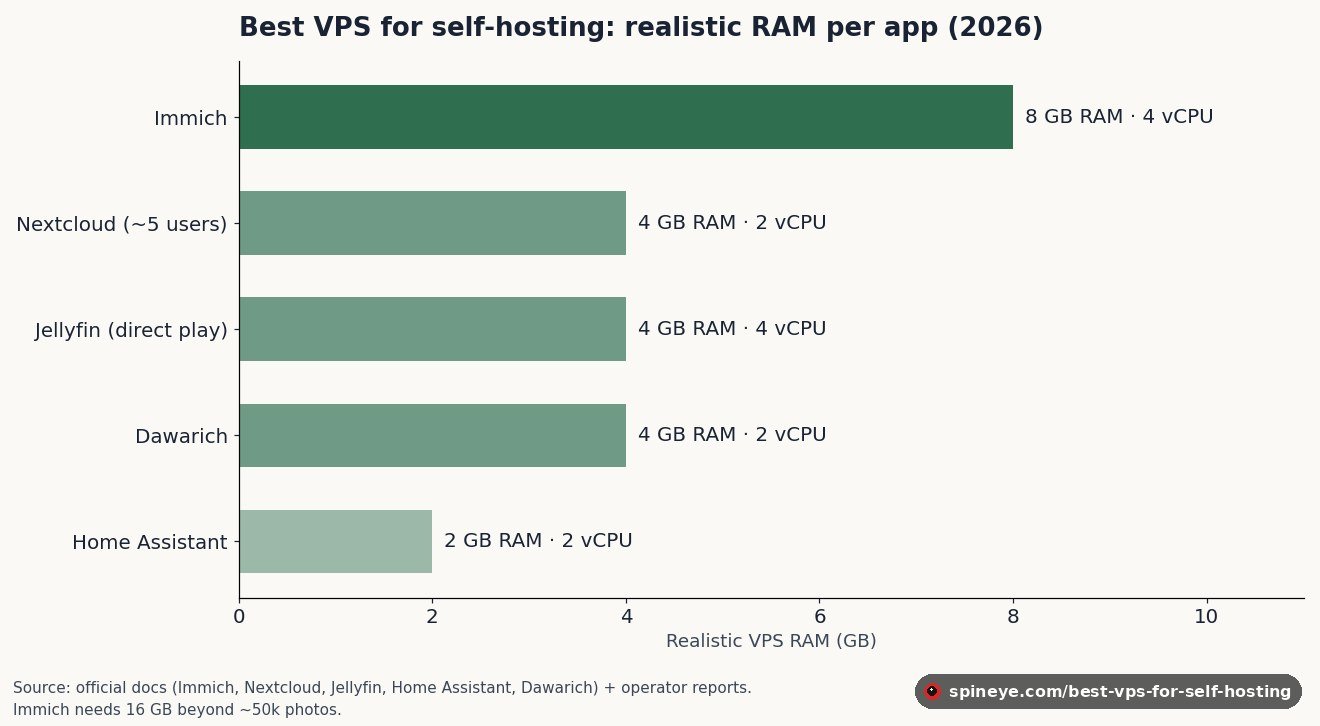
Run all five on one machine and the realistic column adds up to roughly 22 GB of RAM and 14 vCPU. That is a €33–€48 machine, not a €5 one. Most people should not co-host all five — Immich’s machine-learning jobs and Jellyfin’s transcoding compete for exactly the same CPU at exactly the wrong moment.
Immich: the memory figure to plan around
Immich documented asks for 6 GB minimum and recommends 8 GB with four cores. On a 4 GB machine it runs only with machine learning disabled, which removes face recognition and search — most of the reason to choose it over a folder of files.
The reason to buy headroom rather than exactly 8 GB is what operators report during bulk jobs. reported One open issue from February 2026 describes memory peaking at 40 GB while generating thumbnails for roughly 10,000 queued images on version 2.5.5, and the reporter notes that when the job finished the CPU dropped to zero but the memory did not come back. A second open issue from the same month describes the API container sitting at around 4 GB with the server close to unresponsive. Neither has a documented root cause.
At real scale the numbers climb further. reported For a library around 750,000 assets and roughly 5 TB, operators suggest 8 cores and 64 GB, describing 32 GB as the minimum viable figure. A quarter-million assets on 32 GB is a documented working deployment. Both reports mention an initial ingest of about a week. This is not a small VPS workload, and if photos are the reason you are buying a server, size for the library you will have in two years.
One more documented constraint that catches people on cheap storage plans: the Postgres data directory must sit on local SSD and never on a network share. Storage VPS products with network-attached volumes are the wrong shape for Immich. And if what you actually want is to browse and organise photos rather than run a service for other people, a desktop image viewer solves that problem for nothing.
Jellyfin: the GPU problem nobody prices in
Jellyfin documented recommends 8 GB, allows 4 GB for a headless Linux server, requires a CPU supporting SSE4.1, and asks for a 100 GB SSD for the operating system and transcoding cache. Straightforward enough.
The catch is one sentence in the official hardware guidance: “Not having a GPU is NOT recommended for Jellyfin, as video transcoding on the CPU is very performance demanding.” Standard VPS plans do not have a usable GPU. reported Intel processor models ending in F ship without integrated graphics at all, and plenty of Xeon and EPYC server chips have no iGPU either — which describes most of the hardware underneath a shared-CPU VPS. GPU instances exist, but they are sold as AI compute at many times the price of the plans compared here.
The practical consequence is that a VPS Jellyfin has to be engineered for direct play: files in formats your clients decode natively, so the server streams them untouched. Direct play costs the server almost nothing. Transcoding is expensive, and software transcoding of 4K HDR cannot keep up in real time without acceleration. Buy CPU for concurrency, not for transcoding, and standardise your library. Half of that work happens on the client side — an Android player that handles modern codecs natively removes more transcoding load than any CPU upgrade you can buy.
Home Assistant: usually the wrong thing to put on a VPS
The specification is undemanding — documented 2 GB and 2 vCPU for a virtual machine install, with the official Home Assistant Green hardware shipping 4 GB. Any plan here clears that.
The obstacle is physical rather than computational. Zigbee and Z-Wave radios are USB sticks that must be plugged into the machine running Home Assistant, and Bluetooth needs to be in range. A VPS in a data centre is neither. On top of that, the documentation is explicit that container installations have “no out-of-the-box support” for integrations controlled by add-ons, naming Thread and Z-Wave specifically — so the container route also costs you the add-on ecosystem, including Z-Wave JS, the Thread border router, ESPHome and Mosquitto.
To be precise about what the documentation does and does not say: Home Assistant OS is described as the recommended install for most users, and container and VM installs are presented as alternatives for people comfortable with the command line — not discouraged. There is no official page saying “do not run Home Assistant on a VPS.” The case against it is the radios and the LAN, and it is decisive only if your setup uses local devices. A purely cloud-API-driven configuration runs fine remotely.
Nextcloud and Dawarich: the upgrade discipline matters more than the specs
Nextcloud sizing follows a simple published rule from the All-in-One maintainer: documented roughly one vCore and one gigabyte of RAM per active user, on top of an All-in-One baseline of 2 GB and a dual-core machine, rising to about 5 GB and four cores with everything enabled. reported Operators are blunt that 2 GB with one core is not usable for All-in-One; 4 GB and two cores is the practical floor for a small household.
The dangerous part is upgrades. The documentation states you cannot skip major releases, that downgrading “is not supported and risks corrupting your data”, and that after a major upgrade you must let background migrations finish — running cron.php two or three times — before starting the next one. That single instruction is behind a large share of self-inflicted Nextcloud disasters. It also makes unattended container auto-updates genuinely unsafe here. If file sync is not really what you need — if the actual requirement is reaching an object-storage bucket — a free S3 browser replaces the entire stack with a single tool.
Dawarich, which I reviewed separately, documents 2 GB, one core and 10 GB of disk, and warns that it runs “at least 4 running containers”: Postgres, Redis, Sidekiq and the application. reported That 2 GB floor does not survive contact with load — a single Sidekiq container was measured at 3.67 GiB with CPU above 100% on an 8 GB Raspberry Pi 5. The maintainer’s own explanation is straightforward: Ruby is an interpreted language and memory-intensive by nature.
Sizing is only half of the decision with self-hosted software, and the smaller half. The Huntarr incident is worth reading before you hand any of these applications your credentials: a popular companion app for the media stack was reported to return the API keys of every connected service to an unauthenticated request. A VPS makes that failure reachable from the open internet in a way a machine on your home network is not.
The best VPS for self-hosting: six providers compared
Six providers, at the plan closest to the 8 GB figure that most of these applications converge on. Prices observed 16 August 2026. Currencies are not converted — compare within a column.
Tip: klik op een kolomkop om te sorteren.
| Provider | Plan | vCPU | RAM | Storage | Price / month | Term | SLA |
|---|---|---|---|---|---|---|---|
| Hetzner | CX33 | 4 | 8 GB | 80 GB SSD | €8.49 ex VAT | None, hourly | 99.9% |
| OVHcloud | VPS-2 | 4 | 8 GB | 75 GB NVMe | €8.49 / €7.21 on 12 mo | None | 99.9% |
| Netcup | VPS 1000 G12 | 4 | 8 GB DDR5 ECC | 256 GB NVMe | €10.36 incl. VAT | 12 months | Not on VPS |
| Contabo | Cloud VPS 10 | 4 | 8 GB | 75 GB NVMe | $4.50 incl. tax | 1 month minimum | 99.9% |
| Hostinger | KVM 2 | 2 | 8 GB | 100 GB NVMe | $8.79 → $14.99 renewal | Prepaid, multi-year | Not published |
| DigitalOcean | Basic 8 GiB | 4 | 8 GiB | 160 GiB SSD | $48.00 | None, per-second | 99.99% |
Price per gigabyte of RAM
The single most useful comparison for self-hosting, because RAM is the constraint that bites first. Lower is better. Note carefully which bars require prepayment.
Observed 16 August 2026. Contabo and Hostinger’s lowest figures require 12–24 months paid upfront; Hetzner, OVHcloud and DigitalOcean are commitment-free. Contabo is shown including tax, Hetzner and OVHcloud excluding it. Currencies are not converted.
DigitalOcean is six to ten times the price per gigabyte and that is not an error. You are buying a 99.99% SLA, per-second billing, bandwidth pooled across your whole team and an API that most infrastructure tooling already speaks. For a hobby server that is money spent on guarantees you will never invoke. For something people depend on, it is the cheapest of these options to operate.
Hetzner wins — and it is the one provider that could never pay us
Hetzner wins on the combination that matters for self-hosting: €8.49 for four vCPU and 8 GB, a published 99.9% monthly SLA compensated in cloud credit, no minimum term, hourly billing capped monthly, and backups at a flat 20% of the server price across seven slots.
It also pays no commission, because Hetzner is closing its referral programme. According to the customer email circulated in the community, individual referral links remained valid until 15 June 2026 and now redirect to a general €20 promotional code, referral bonuses can only be credited until 31 August 2026, and existing credit stays redeemable until 31 December 2027. The stated reason is a strategic realignment toward central promotional campaigns. I could not find this on a Hetzner-hosted page — the relevant documentation URLs now redirect or 404 — so treat the dates as reproduced from a customer email rather than officially published.
Two things to check before you buy. Hetzner’s IPv4 address is a separate €0.50 per month, which the plan prices exclude. And at the time of writing, the Cost-Optimized CX and CAX plans are marked as currently unavailable on the site even though the live price feed still lists all three EU locations as active — worth confirming capacity before you commit.
What to read in the small print
Headline prices hide most of the real differences between these providers. Four things account for nearly all of it.
Renewal pricing. Hostinger’s KVM 2 is advertised at $8.79 but renews at $14.99 per month for two years — a 70% increase. That is not unusual in shared hosting and it is disclosed, but a comparison quoting only the promotional rate is misleading. Budget the renewal figure.
Commitment. Netcup’s advertised prices assume a twelve-month term; a zero-month term adds €1.58 per month. Contabo’s cheapest rates assume twelve months. Hetzner, OVHcloud and DigitalOcean have no minimum term at all — with hourly or per-second billing, an experiment that goes wrong costs pennies.
Bandwidth. Three different models. OVHcloud and Contabo advertise unlimited traffic, Contabo with a fair-use policy on outbound. DigitalOcean gives a per-Droplet allowance pooled across your team and charges $0.01 per GiB over. Hetzner bills €1.00 per TB over its allowance — but €7.40 per TB in Singapore, which is the kind of detail that turns a media server into an unpleasant invoice. Netcup’s flat rate is honest about its limit: sustained traffic above 2 TB over 24 hours is throttled to 200 Mbps until it drops.
Backups. OVHcloud includes a rolling seven-day automatic backup replicated three times within the data centre, at no extra cost — the only provider here that does. Hetzner charges 20% of the server price. DigitalOcean charges 20% weekly or 30% daily. Hostinger states weekly backups and manual snapshots are included. For Nextcloud and Dawarich, whose documentation demands a fresh backup before every upgrade, this line item is not optional.
Pros and cons of the top pick
Hetzner CX33 — strengths
- €8.49 for 4 vCPU and 8 GB, the cheapest credible plan at this size
- Published 99.9% SLA, compensated in cloud credit
- No contract; hourly billing with a monthly cap
- Backups a flat 20% with seven slots
- Incoming and internal traffic free; €1.00 per TB overage in the EU
Hetzner CX33 — drawbacks
- IPv4 costs €0.50 per month on top
- CX and CAX plans currently flagged unavailable on the site
- Cost-Optimized line is EU-only; US needs the pricier CPX range
- Singapore traffic overage is €7.40 per TB, over seven times the EU rate
- Powered-off servers keep billing until deleted
Which VPS do you actually need?
Tick what you plan to run. The calculator applies the realistic column from the table above, not the documented minimums, and adds a gigabyte for the operating system and Docker.
Who should skip a VPS entirely
Three cases where renting a server in a data centre is the wrong instrument.
Home automation with physical devices. Covered above, and it is absolute: the radios have to be in the building.
Large media libraries. A 5 TB photo or video collection on VPS block storage costs far more per month than the same disk sitting in a machine at home, and every byte you upload crosses your domestic connection first. Self-hosting at scale is where old hardware still wins.
You want to learn without a bill. If the goal is understanding Docker and Linux, a second-hand mini PC or a Raspberry Pi teaches the same lessons and stops charging you when you lose interest. The case for a VPS is uptime, bandwidth and remote access — not learning.
It is also worth checking that you need a server at all. Plenty of the tools people rent hardware for run perfectly well on a laptop: self-hosted transcription is a batch job, not a service, and much of what turns up in our survey of 806 Reddit threads on hidden-gem software is desktop software that never needed a container.
Final verdict
Best VPS for self-hosting, August 2026
Hetzner CX33 for most people: €8.49 for 4 vCPU and 8 GB, no contract, a real SLA, and the fewest surprises in the small print. Budget €0.50 more for IPv4 and check plan availability before committing.
Contabo Cloud VPS 30 if you want the most memory per euro and can accept an unpublished setup fee and no hourly billing. OVHcloud VPS-2 if included backups and zero commitment matter more than the last euro. DigitalOcean only when the 99.99% SLA and the API are worth six times the price per gigabyte.
The most useful thing here is not the ranking, though. It is that Immich needs 8 GB with headroom rather than the 4 GB plan most people reach for, that Jellyfin on a VPS is a direct-play decision rather than a CPU purchase, and that Home Assistant probably should not be on a VPS at all. Size for the application, then pick the provider.
Frequently asked questions
How much RAM do I need for a self-hosted server?
It depends entirely on what you run. Immich documents 8 GB recommended, Nextcloud needs roughly 4 GB for a small household, Jellyfin runs on 4 GB headless, Home Assistant on 2 GB, and Dawarich realistically wants 4 GB despite documenting 2 GB. Running all five on one machine means around 22 GB. Add a gigabyte for the operating system and Docker.
Is Hetzner still the best VPS for self-hosting in 2026?
On price, SLA and terms, yes — €8.49 for 4 vCPU and 8 GB with a 99.9% SLA and no contract is the strongest combination here. Two caveats: IPv4 costs €0.50 extra, and the Cost-Optimized plans were flagged as currently unavailable on Hetzner’s site when this was written.
Can I run Jellyfin on a VPS?
Yes, but only as a direct-play server. Jellyfin’s own documentation says running without a GPU is not recommended because CPU transcoding is very demanding, and standard VPS plans have no usable GPU. Store your library in formats your clients decode natively and the server load is almost nothing; rely on transcoding and 4K HDR will not keep up in real time.
Should I run Home Assistant on a VPS?
Usually not. Zigbee and Z-Wave controllers are USB devices that must be physically attached, and Bluetooth needs to be in range — none of which a data centre can offer. Container installations also have no out-of-the-box support for Thread and Z-Wave, which are add-on-controlled. A VPS makes sense only for a setup driven entirely by cloud APIs.
Which VPS is cheapest per gigabyte of RAM?
Contabo, at roughly $0.58 per gigabyte on the Cloud VPS 30 with a twelve-month term. OVHcloud and Hostinger’s promotional tiers land near $0.81–0.90, Hetzner around €1.00–1.06 with no commitment at all, and DigitalOcean at $6.00 — where you are paying for a 99.99% SLA rather than raw memory.
Do I need a GPU on my VPS?
Only for video transcoding or Immich’s machine-learning acceleration, and standard VPS plans do not offer one. GPU instances are sold as AI compute at many times the price. For Jellyfin, plan for direct play; for Immich, accept that machine learning runs on the CPU and will be slower, and budget more cores instead.
Is it safe to auto-update self-hosted apps on a VPS?
Not for these. Nextcloud’s documentation forbids skipping major releases and says downgrading risks corrupting data. Dawarich ships resource-intensive data migrations and version 0.26.0 required a jump to PostgreSQL 17 with PostGIS 3.5. Immich has no supported downgrade path at all, even within the same minor version. Update deliberately, and take a backup first — the discipline is closer to how tracking app releases directly from their source works than to letting a store update everything overnight.
What hidden costs should I expect?
Four, mostly: renewal pricing after a promotional term — Hostinger’s KVM 2 goes from $8.79 to $14.99; Hetzner’s €0.50 monthly IPv4 charge; backups, which only OVHcloud includes free; and bandwidth overage, where Hetzner charges €1.00 per TB in the EU but €7.40 per TB in Singapore. Contabo also charges a setup fee on some plans, though the amount is not published.
Sources
- Immich — System Requirements and Upgrading, official documentation.
- Immich issue #25989 — memory peak during thumbnail generation, February 2026; issue #26162.
- Nextcloud — System Requirements and Upgrade documentation; sizing rule from All-in-One discussion #1335.
- Jellyfin — Hardware Selection and Hardware Acceleration.
- Home Assistant — Installation, including the documented add-on limitation for container installs.
- Dawarich — Hardware Requirements and Updating; memory report in issue #1839.
- Hetzner Cloud pricing, billing FAQ and cloud SLA.
- OVHcloud VPS pricing; commitment tiers and zero setup fees cross-checked against OVH’s public catalogue API.
- Netcup vServer pricing, including the statement that the 99.9% availability guarantee does not apply to VPS.
- Contabo Cloud VPS pricing; Hostinger VPS pricing; DigitalOcean Droplet pricing and SLA.
- Hetzner referral programme closure — customer email reproduced at LowEndTalk. Not published on a Hetzner-hosted page at the time of writing.